Google Search Console for AI Visibility Tracking Guide
Learn how to use Google Search Console to monitor AI visibility. Setup GSC, track AI traffic patterns, and control content in AI Overviews.
Table of Contents
- What is Google Search Console and Why It Matters for AI
- Setting Up Google Search Console
- Understanding GSC Performance Report Limitations
- Estimating AI Traffic Through Query Analysis
- Third-Party Tools for AI Overview Tracking
- Controlling Content in AI Overviews
- Monitoring Search Console AI Features
- Comparing GSC to Other Analytics Tools
- Best Practices for AI Visibility in GSC
- Future of AI Tracking in Search Console
- What is Google Search Console and Why It Matters for AI
- Setting Up Google Search Console
- Understanding GSC Performance Report Limitations
- Estimating AI Traffic Through Query Analysis
- Third-Party Tools for AI Overview Tracking
- Controlling Content in AI Overviews
- Monitoring Search Console AI Features
- Comparing GSC to Other Analytics Tools
- Best Practices for AI Visibility in GSC
- Future of AI Tracking in Search Console
What is Google Search Console and Why It Matters for AI
Google Search Console is a free tool from Google that helps website owners monitor their site’s presence in search results. With the rise of AI, such as AI Overviews in Google Search, tracking how your content appears in AI-generated responses has become increasingly important for SEO experts and content marketers.
The main challenge is that Google Search Console does not provide dedicated reporting for GSC AI Overviews. All AI impressions and clicks are mixed with regular web search data in the Performance report. This makes it difficult to understand how your content performs specifically in AI-generated summaries.
Despite this limitation, you can still use Google Search Console to estimate AI-related traffic and control how your content appears in AI Overviews. This guide explains the Search Console setup, tracking methods, and content control options available through GSC AI features.
Setting Up Google Search Console
Before tracking any search performance, set up Google Search Console for your website. The process takes about 15 minutes if you have access to your website’s backend.
- Go to search.google.com/search-console and sign in with your Google account.
- Click on “Add Property” and enter your website URL. Choose between domain property or URL prefix property. Domain property covers all subdomains and protocols, while URL prefix only covers the specific URL you enter.
- Proceed to verification, where Google needs to confirm you own the website. Options include HTML file upload, HTML tag, Google Analytics, Google Tag Manager, or DNS record. The HTML tag method is popular with most web developers. Copy the meta tag and paste it into your website’s head section.
- Once verification completes, data starts collecting immediately but takes 2-3 days before you see meaningful reports in the GSC performance report. Google Search Console stores data for 16 months, offering plenty of historical data to analyze trends.
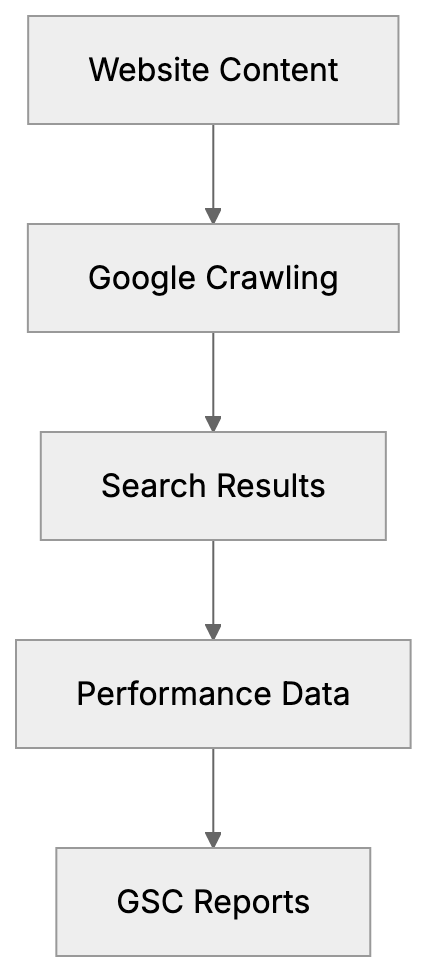
Google Search Console Data Flow:
Understanding GSC Performance Report Limitations
The Performance report in Google Search Console shows clicks, impressions, CTR, and average position for your website. When you filter by “Web” search type, this includes both traditional search results and AI Overviews traffic.
Google does not separate Google AI visibility data from regular search data. When someone sees your content cited in an AI Overview and clicks through, that click appears alongside regular organic clicks. There’s no filter or dimension to isolate AI traffic specifically.
This aggregation poses a major challenge for marketing professionals trying to measure AI visibility impact. Questions like “How many clicks came from AI Overviews?” or “Which pages appear most in AI summaries?” cannot be answered directly using GSC alone.
Though the Performance report does show query data, long-tail queries with 10 or more words tend to trigger AI Overviews more than short queries. By filtering these longer queries, you can estimate which traffic might be AI-related.
Estimating AI Traffic Through Query Analysis
Since Google Search Console AI tracking isn’t available directly, use indirect methods. Query length and pattern analysis help identify potential AI Overview traffic.
Begin by exporting your query data from the Performance report. Look for queries with 10 or more words. These longer, more conversational queries often trigger AI Overviews. Questions starting with “how to,” “what is,” “why does,” or “can I” are especially common in AI results.
Compare performance metrics between short queries (1-3 words) and long queries (10+ words). If long queries have higher CTR or different position patterns, this might indicate AI Overview influence. AI Overviews typically appear for informational queries rather than transactional ones.
Query Analysis Strategy:

Another method is monitoring sudden changes in CTR for specific queries. When Google adds AI Overviews to a search result page, traditional result CTRs often drop because users receive answers directly from the AI summary. A CTR drop combined with maintained impressions could signal new AI Overview presence.
Create a custom filter in GSC to track queries containing question words. Go to Performance, click “New” under queries filter, and add regex patterns for common question formats. This won’t give exact AI traffic numbers but provides directional ideas.
Third-Party Tools for AI Overview Tracking
Several SEO tools have developed dedicated features to track AI Overview appearances since Google Search Console doesn’t provide this data natively.
- Semrush: Offers AI Overview tracking in their Position Tracking tool. It monitors which keywords trigger AI Overviews and whether your content gets cited. The tool checks daily and sends alerts when your pages appear in or disappear from AI summaries.
- Ahrefs: Added AI Overview detection to their Rank Tracker feature. It identifies SERP features including AI Overviews and shows historical data on when AI results appeared for tracked keywords.
- SISTRIX: Provides AI Overview monitoring in their Visibility Index. The tool specifically flags keywords where AI Overviews appear and tracks citation frequency.
- BrightEdge and Conductor: Added AI tracking capabilities. These enterprise-level platforms offer more detailed AI analytics, but come with higher price points suited for larger organizations.
| Tool | AI Overview Tracking | Price Range | Best For |
|---|---|---|---|
| Semrush | Yes, with alerts | $129-$499/month | Marketing teams |
| Ahrefs | Yes, historical data | $99-$999/month | SEO professionals |
| SISTRIX | Yes, visibility tracking | €99-€599/month | European markets |
| BrightEdge | Yes, enterprise features | Custom pricing | Large organizations |
| Conductor | Yes, detailed analytics | Custom pricing | Enterprise SEO |
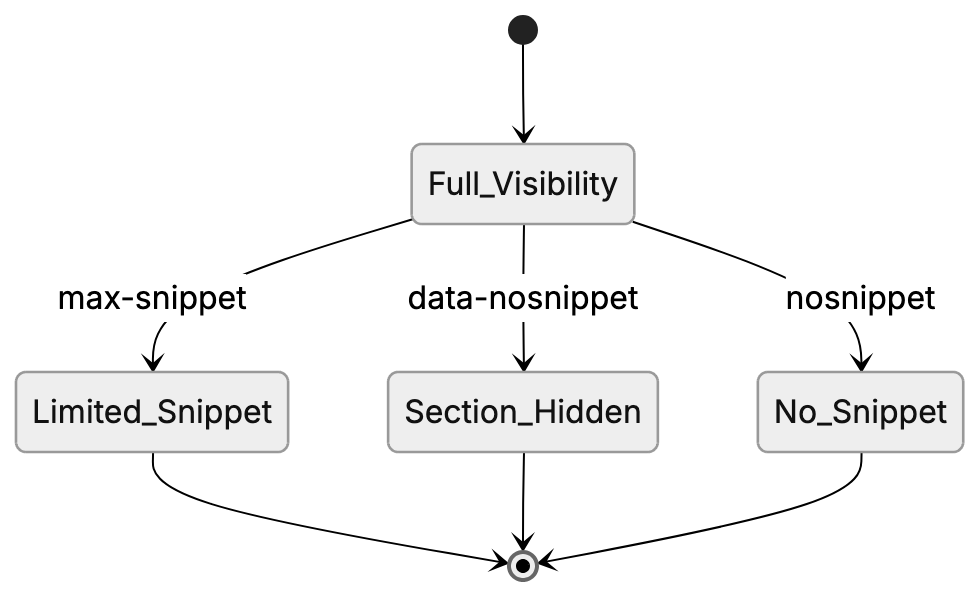
Content Control Options:
Controlling Content in AI Overviews
Google provides several meta directives that let you control how your content appears in AI-generated summaries. These work through the same mechanisms as traditional snippet control.
- The
nosnippetdirective completely blocks your content from appearing in any snippets, including AI Overviews. Add this meta tag to your page’s head section:<meta name="robots" content="nosnippet">. This prevents Google from showing any text preview, but doesn’t affect your search ranking. - For more granular control, use
max-snippetto limit how much text Google can use. The syntax is<meta name="robots" content="max-snippet:160">where 160 is the maximum character count. This works for both traditional snippets and AI Overview citations. - The
data-nosnippetattribute lets you block specific page sections from snippets while allowing others. Wrap sensitive or incomplete information in<span data-nosnippet>content here</span>tags.
These controls apply to AI Overviews because Google’s AI uses the same content extraction systems as traditional search snippets. If you block snippet generation, you also block AI Overview citations. Consider whether reduced AI visibility is worth protecting certain content.
Monitoring Search Console AI Features
While dedicated GSC AI Overviews reporting doesn’t exist, you can still use Google Search Console features to monitor overall search performance that includes AI traffic.
- The Performance report remains your primary tool. Set up regular exports of query data, filtering for informational keywords. Compare week-over-week changes in CTR and impressions. Sudden drops might indicate new AI Overview competition.
- Use the Page report to identify which URLs get the most impressions for long-tail queries. These pages are likely candidates for AI Overview citations.
- The Coverage report shows indexing issues that could prevent your content from appearing in search results or AI Overviews. Fix errors like blocked resources or redirect chains that might limit your AI visibility.
- Set up email alerts in Search Console settings. Google notifies you about sudden traffic changes, indexing problems, or security issues.
Comparing GSC to Other Analytics Tools
Google Search Console provides search-specific data that general analytics platforms like Google Analytics don’t record. Understanding the differences helps marketing professionals use each tool effectively.
- Google Analytics shows user behavior after they reach your site, but has limited search query data. Google Search Console focuses on pre-click behavior, showing exactly which queries triggered impressions and clicks. For AI traffic tracking, GSC’s query data is more valuable.
- Google Analytics 4 can track engagement metrics like time on page and conversion rates. Cross-reference this with GSC query data to identify which long-tail queries (potentially from AI Overviews) drive the most valuable traffic.
Third-party tools like Semrush provide dedicated AI Overview tracking in addition to GSC data. However, they typically sample data rather than providing complete coverage like Google Search Console does for overall search performance.
For complete AI visibility monitoring, use Google Search Console as your foundation for query and performance data. Layer on third-party tools for specific AI Overview tracking.
Best Practices for AI Visibility in GSC
Maximizing your chance of appearing in AI Overviews requires strategic content improvement that you can monitor through Search Console metrics.
- Focus on informational content that answers specific questions. AI Overviews primarily appear for how-to guides, explanations, and comparison queries.
- Structure content with clear headers and concise paragraphs. Google’s AI extraction works better with well-organized content.
- Target long-tail keywords with question intent. Use GSC query data to find variations of questions people actually search. Create content addressing these specific queries rather than generic topics.
Regularly review your top-performing queries in Search Console. Look for patterns in the types of questions driving traffic. Expand content around these topics to increase AI Overview citation opportunities.
Future of AI Tracking in Search Console
Google has not announced plans to add dedicated AI Overview reporting to Search Console, but as AI results become more prominent, separate tracking seems likely.
The current aggregation of AI and traditional search data reflects Google’s position that AI Overviews are part of the search experience, not a separate feature. This might change as AI results evolve and marketers demand clearer attribution.
SEO experts expect Google will eventually provide AI-specific dimensions in the Performance report, similar to how they separate News, Image, and Video search types. This would allow filtering specifically for AI Overview impressions and clicks.
Until then, the combination of Google Search Console for query analysis and third-party tools for AI detection remains the best approach for tracking AI visibility. Keep monitoring GSC announcements for new features.
Google Search Console remains essential for monitoring search performance even though it lacks dedicated AI Overviews reporting. The Performance report aggregates AI traffic with regular web search data, making exact AI tracking impossible through GSC alone.
You can estimate AI-related traffic by filtering for long-tail queries with 10 or more words and informational intent patterns. Third-party tools like Semrush, Ahrefs, and SISTRIX offer more specific AI Overview tracking capabilities. Control your content’s appearance in AI summaries using nosnippet, data-nosnippet, and max-snippet meta directives. Set up Search Console properly, monitor query patterns regularly, and combine GSC data with specialized AI tracking tools for comprehensive visibility monitoring. As AI search features expand, expect Google to eventually add dedicated AI reporting to Search Console.
Frequently Asked Questions
How can I set up Google Search Console for my website?
To set up Google Search Console, visit search.google.com/search-console and sign in. Click ‘Add Property’, enter your website URL, verify ownership through methods like HTML tags or Google Analytics, and data will begin collecting. Expect meaningful reports to appear after about 2-3 days.
What are the limitations of the GSC Performance report for tracking AI traffic?
The GSC Performance report combines AI traffic with regular search data, making it difficult to isolate clicks and impressions specifically attributed to AI Overviews. There’s no direct filter for AI traffic, creating challenges for accurately measuring AI visibility impact.
How can I estimate the traffic generated from AI Overviews?
Estimates can be made by analyzing query lengths and patterns. Focus on queries with 10 or more words, as they often trigger AI Overviews. Monitoring CTR and identifying sudden drops in specific long-tail queries may also indicate the influence of AI summaries.
What third-party tools can I use for tracking AI Overviews?
Tools such as Semrush, Ahrefs, and SISTRIX offer dedicated tracking features for AI Overviews. They provide data on which keywords trigger AI summaries and alert you when your content appears. These tools complement Google Search Console by providing specialized insights.
Can I control how my content appears in AI Overviews?
Yes, you can use meta directives like nosnippet, max-snippet, and data-nosnippet to control content visibility in AI Overviews. These directives dictate what Google can show in snippets, which also applies to AI-generated summaries.
What should I focus on to improve my chances of appearing in AI Overviews?
Concentrate on creating informational content that directly answers common questions. Structuring your content clearly with targeted long-tail keywords and clear headers can enhance the likelihood of appearing in AI Overviews.
Will Google Search Console add dedicated AI tracking features in the future?
While there are no current announcements, the demand for clearer AI visibility tracking could prompt Google to introduce specific reporting features. SEO experts speculate that future updates may allow filtering for AI Overviews similar to other distinct search types.