llms.txt Specification Guide: Format, Implementation & Reality
Complete guide to llms.txt specification, format structure, implementation tools, and realistic adoption expectations for AI documentation optimization.
Table of Contents
- What is llms.txt and Why Does It Exist
- Understanding the llms.txt Specification Format
- How to Implement llms.txt on Your Website
- Realistic Adoption and Current Usage Status
- Comparing llms.txt to Alternative AI Optimization Methods
- Who Should Create an llms.txt File
- Future Outlook and Specification Development
- Practical Tips for Creating Effective llms.txt Files
- Real World Implementation Examples
- Measuring Impact and Effectiveness
- Common Mistakes to Avoid
- End
- What is llms.txt and Why Does It Exist
- Understanding the llms.txt Specification Format
- How to Implement llms.txt on Your Website
- Realistic Adoption and Current Usage Status
- Comparing llms.txt to Alternative AI Optimization Methods
- Who Should Create an llms.txt File
- Future Outlook and Specification Development
- Practical Tips for Creating Effective llms.txt Files
- Real World Implementation Examples
- Measuring Impact and Effectiveness
- Common Mistakes to Avoid
- End
What is llms.txt and Why Does It Exist
The llms.txt specification is an experimental standard created by Jeremy Howard from Answer.AI in September 2024. It aims to help websites communicate their content structure to large language models more effectively.
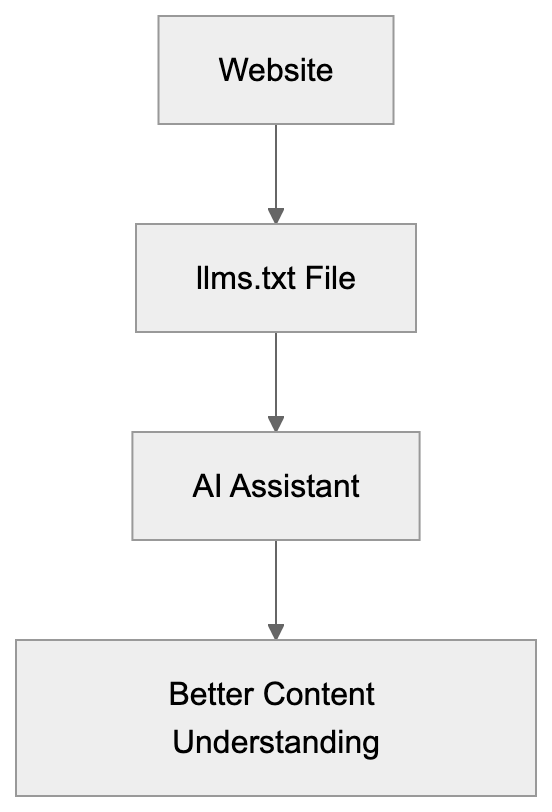
Think of it as a specialized file similar to robots.txt or sitemap.xml but designed specifically for AI systems. The llms.txt file lives at the root of your website at /llms.txt and contains a Markdown-formatted description of your site’s content.
The purpose is straightforward. When AI assistants like ChatGPT or Claude access your website, they need to understand what content you offer and where to find it. The llms.txt format provides this information in a structured way that fits well within AI context windows.
Website owners create this file to make their content more discoverable and useful for AI systems. The specification focuses on technical documentation sites, developer resources, and knowledge bases where AI assistants frequently search for information.
But here’s the reality check. No major AI company officially supports llms.txt for automated crawling yet. Not OpenAI, not Google, not Anthropic, not Perplexity. The practical use right now is mainly manual sharing with AI assistants.
Understanding the llms.txt Specification Format
The llms.txt specification follows a simple Markdown structure. You can find the official spec at llmstxt.org, which provides detailed formatting guidelines.
The basic format includes several key sections:
llms.txt Purpose and Function:
- A brief description of your website or project.
- Optional details about the main features or purpose.
- A list of important URLs with descriptions.
Here’s what a basic llms.txt example looks like for a documentation site:
# ProjectName Documentation

Comprehensive guides and API references for ProjectName.

## Main Sections

- Getting Started: /docs/getting-started
- API Reference: /docs/api
- Tutorials: /docs/tutorials
- FAQ: /docs/faq
The format allows for nested sections and hierarchical organization. You can include categories, subcategories, and specific page URLs. Keep descriptions concise since AI context windows have limits.
The specification recommends keeping the entire file under 100KB. This ensures it loads quickly and doesn’t exceed typical AI input limits. Focus on your most important content rather than listing every single page.
You can also include metadata like last updated dates or contact information, but the core requirement is simple: describe what your site offers and where to find it.
How to Implement llms.txt on Your Website
Implementing an llms.txt file is technically simple. You create a plain text file with Markdown formatting and place it at your domain root.
For static sites, just add llms.txt to your public folder. For WordPress sites, you can manually upload it via FTP or use a plugin. The file needs to be accessible at https://yourdomain.com/llms.txt.
Several tools now help with llms.txt setup. Yoast SEO added support for generating llms.txt files automatically. Mintlify, a documentation platform, also includes built-in llms.txt generation for technical documentation sites.
These auto-generation tools scan your site structure and create the file based on your existing content organization. They save time compared to manual creation, but you should still review the output.
For manual creation:
- Start by outlining your main content categories.
- Add your most important pages under each category.
- Include brief descriptions that help AI understand what each page contains.
Test your setup by checking if the file loads correctly in a browser at yourdomain.com/llms.txt. Make sure there are no 404 errors or access issues.
Update your llms.txt file when you add major new sections or significantly restructure your content. Treat it like a sitemap, keeping it reasonably current, but not obsessing over every small change.
Realistic Adoption and Current Usage Status
The adoption reality for llms.txt differs significantly from the initial hopes. Semrush conducted experiments in late 2024 and found zero crawler visits to llms.txt files from major AI companies.
No AI crawler has publicly announced support for automatically reading llms.txt files. OpenAI’s GPTBot, Google’s crawler, Anthropic’s ClaudeBot, and Perplexity’s bot all ignore the llms.txt specification currently.
This doesn’t mean the specification is useless. The primary practical use is manual sharing with AI assistants. When you’re working with ChatGPT or Claude, you can paste your llms.txt content to help the AI understand your site structure.
Some technical documentation sites have implemented llms.txt anyway. They view it as a future investment or use it internally to help their own teams understand content organization.
The specification remains experimental. Jeremy Howard and the Answer.AI team continue developing it, but widespread adoption requires buy-in from AI companies. Without automated crawler support, the benefits remain limited.
Comparing llms.txt to Alternative AI Optimization Methods
Several approaches exist for improving content for AI systems. Here’s how llms.txt compares to the main alternatives:
| Method | Purpose | AI Crawler Support | Setup Difficulty | Current Effectiveness |
|---|---|---|---|---|
| llms.txt | Structured site description for AI | None official | Easy | Limited to manual use |
| robots.txt AI directives | Control AI crawler access | Partial (some respect it) | Easy | Moderate for blocking |
| Structured data markup | Provide context about content | Good (search engines) | Medium | High for search |
| Sitemap.xml | List all pages for crawlers | Universal | Easy | High for discovery |
| Meta tags improvement | Page-level AI context | Minimal | Easy | Low for AI, high for search |
Current AI Crawler Support Status:

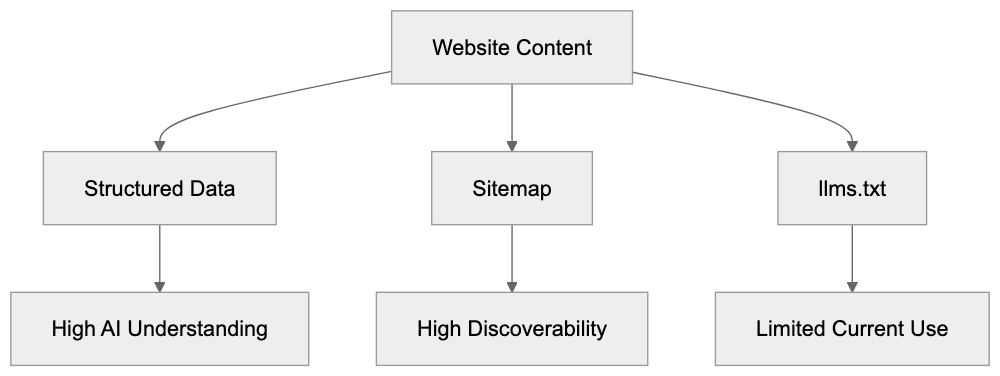
Structured data markup using Schema.org remains the most effective method for helping AI understand your content. Search engines and some AI systems already parse this data.
Sitemaps provide better guaranteed discovery than llms.txt since all major crawlers support them. They don’t offer the same contextual descriptions but ensure pages get found.
Robots.txt directives for AI crawlers work when you want to block access. Some AI companies respect these rules, though enforcement varies. This is useful for preventing AI training on your content.
Meta tags and descriptions help with traditional search, but most AI systems don’t prioritize them for understanding site structure.
The llms.txt specification offers better human readability and simpler syntax than alternatives, but without crawler support, this advantage doesn’t translate to practical benefits yet.
Who Should Create an llms.txt File
Technical documentation sites benefit most from llms.txt setup. If you maintain API docs, developer guides, or technical knowledge bases, the specification matches well with your content type.
Software development teams can use llms.txt files internally. Even without AI crawler support, the file is a content map for team members and can be shared with AI assistants during development.
Open source projects might implement llms.txt as part of their documentation strategy. It costs minimal effort and positions the project as forward-thinking even if immediate benefits are limited.
Content marketers and SEO experts should understand the specification exists but shouldn’t prioritize it over proven improvement methods. Focus on traditional SEO, structured data, and quality content first.
Small business owners with simple websites probably don’t need llms.txt files yet. The effort doesn’t justify the limited current benefits unless you frequently work with AI assistants and want to share your site structure manually.
Marketing professionals managing large content libraries might create llms.txt files for internal organization benefits. The process helps document content architecture even without external AI crawler support.
Web developers implementing new sites can add llms.txt as a forward-looking feature. It takes minimal time during initial setup and might provide value if AI companies eventually support the specification.
Future Outlook and Specification Development
The llms.txt specification continues evolving through community input. The official site at llmstxt.org accepts feedback and suggestions for format improvements.
Content Optimization Approaches Comparison:
 For the specification to succeed long-term, major AI companies need to announce official support. This means OpenAI, Google, Anthropic, and others would need to program their crawlers to read and respect llms.txt files.
Currently, there’s no public roadmap for such support. AI companies focus on improving their crawling and understanding of standard web formats rather than adopting new specifications.
The specification might gain traction if documentation platforms widely adopt it. When tools like Mintlify, GitBook, and ReadMe automatically generate llms.txt files, it creates an important mass of available files.
Some developers hope llms.txt becomes a standard similar to robots.txt, but robots.txt succeeded because it solved a clear problem (controlling crawler access) that all parties agreed needed solving.
The value proposition for llms.txt is less clear to AI companies. They already extract content and structure from websites using existing methods. A new file format requires engineering resources without guaranteed improvements.
Web developers and SEO experts should monitor the specification, but not depend on it for AI improvement strategies. Treat it as an experimental addition rather than a core requirement.
Practical Tips for Creating Effective llms.txt Files
If you decide to implement an llms.txt file, follow these practical guidelines:
- Start with your most important content sections rather than trying to list everything.
- Keep descriptions clear and concise. AI systems work better with straightforward language than marketing copy or technical jargon.
- Organize content hierarchically using Markdown heading levels. Use H2 for main sections and H3 for subsections.
- Include absolute URLs rather than relative paths to ensure links work correctly when shared outside your website context.
- Update the file when you restructure major sections or add significant new content areas.
- Test your llms.txt file with actual AI assistants. Paste the content into ChatGPT or Claude and ask questions about your site.
- Keep the total file size reasonable. Aim for under 50KB for most sites.
- Consider adding a brief statement about your content’s purpose and target audience.
Real World Implementation Examples
Several technical documentation sites have implemented llms.txt files as early adopters. These examples show different approaches to the specification format.
Answer.AI, the organization behind the specification, maintains an llms.txt file on their site. It serves as a reference setup showing recommended practices.
Some documentation platforms now generate llms.txt files automatically for all hosted projects. This creates a growing collection of real-world examples across different content types.
Open source projects with extensive documentation have started adding llms.txt files to their repositories, typically including links to getting started guides, API references, and contribution guidelines.
The format varies based on content complexity. Simple projects might have a 2KB file with just main sections, while large documentation sites might use 30-40KB with detailed hierarchies.
Most implementations focus on linking to existing documentation rather than duplicating content. The llms.txt file is a roadmap, not a replacement for actual documentation pages.
Some sites include information about their content license or usage restrictions in the llms.txt file to help AI systems understand any limitations on how the content should be used.
Measuring Impact and Effectiveness
Measuring llms.txt effectiveness proves challenging without AI crawler support. Traditional analytics won’t show direct traffic or ranking improvements from the file.
You can track how often you manually share your llms.txt content with AI assistants. If you frequently paste it into ChatGPT or Claude sessions, that indicates internal value.
Monitor server logs for requests to /llms.txt to see if any crawlers access the file. Most sites report zero crawler visits currently, but this might change as adoption grows.
Survey your developer team or documentation users to see if they find the llms.txt file helpful for understanding site structure. This qualitative feedback matters more than quantitative metrics right now.
Compare the effort required to create and maintain your llms.txt file against the benefits you observe. For most sites, the creation effort is minimal, but ongoing benefits remain limited.
Track announcements from AI companies about potential llms.txt support. This remains the key factor that could transform the specification from experimental to practical.
Consider the llms.txt file as part of your broader documentation strategy rather than a standalone improvement tactic. Its value comes from organizing your thinking about content structure.
Common Mistakes to Avoid
Don’t expect immediate SEO benefits from adding an llms.txt file. The specification doesn’t affect traditional search rankings and won’t improve your Google position.
Avoid duplicating your entire site content in the llms.txt file. Keep it focused on structure and navigation rather than copying full text from pages.
Don’t create an llms.txt file and never update it. Outdated structure information can confuse AI assistants more than help them.
Skip complex formatting or fancy Markdown features. Stick to simple headings, lists, and links that any system can parse reliably.
Don’t prioritize llms.txt creation over proven improvement methods. Implement good SEO practices, structured data, and quality content first.
Avoid making claims about AI crawler support when sharing about your llms.txt setup. Be honest that it’s currently experimental without official backing.
Don’t assume creating an llms.txt file means AI systems will automatically understand or prioritize your content. The specification helps when manually shared but doesn’t guarantee automated discovery.
End
The llms.txt specification represents an interesting experiment in AI-improved documentation. Created by Jeremy Howard in September 2024, it provides a standardized format for describing website content to large language models.
The reality is that no major AI company currently supports automated crawling of llms.txt files. Semrush testing found zero crawler visits from OpenAI, Google, Anthropic, or Perplexity. This limits practical applications to manual sharing with AI assistants.
Technical documentation sites and developer resources benefit most from setup. The format works well for organizing complex information hierarchies in a way AI systems can process when given the content directly.
Tools like Yoast SEO and Mintlify now support llms.txt generation. This makes setup easier but doesn’t change the fundamental adoption challenge without AI crawler support.
Small business owners and marketing professionals should maintain realistic expectations. The llms.txt format won’t improve search rankings or AI visibility automatically. Its value lies mainly in internal organization and manual AI assistant exchanges.
The specification continues developing and might gain traction if major AI platforms announce support. Until then, treat it as an experimental addition rather than a core improvement requirement for your website.
Frequently Asked Questions
What is the primary purpose of an llms.txt file?
The llms.txt file is designed to help AI systems understand the content structure of a website. It provides a structured way for AI to access important sections and URLs, similar to a sitemap, but optimized for AI interactions.
How can I create an llms.txt file for my website?
To create an llms.txt file, draft a plain text document using Markdown formatting and include key sections such as a site description and important URLs. Place this file in the root directory of your website for easy access.
Is there any official support for llms.txt from major AI companies?
As of now, no major AI company officially supports automated crawling of llms.txt files. This means that while the specification may be useful for manual interactions, its effectiveness in automated contexts remains limited.
What are the advantages of using llms.txt?
The main advantage of using llms.txt is to provide clarity about your site’s content organization, helping AI assistants to better understand and interact with your information when shared manually. It can also serve as a central document for internal teams.
How frequently should I update my llms.txt file?
You should update your llms.txt file whenever you make significant changes to your website’s structure or add new major sections. Keeping it current helps prevent confusion for AI assistants and improves manual sharing relevance.
Can I generate an llms.txt file automatically?
Yes, some tools like Yoast SEO and Mintlify offer features that can generate llms.txt files automatically based on your site’s existing structure. However, it is essential to review the automatically generated content to ensure accuracy.
Who should consider implementing an llms.txt file?
Organizations managing technical documentation, API references, or developer resources are most likely to benefit from llms.txt implementation. Others, such as small business owners, might not find it necessary unless frequently interacting with AI assistants.