Robots.txt for AI Crawlers: Complete Guide
Learn how to control AI crawler access with robots.txt. Block GPTBot, ClaudeBot, CCBot and other AI bots. Includes exact syntax and validation methods.
Table of Contents
- What Is Robots.txt for AI Crawlers
- Why AI Crawler Control Matters
- How Robots.txt Syntax Works for AI Bots
- AI Crawlers You Should Know About
- Complete Robots.txt Configuration Examples
- Crawlers That Ignore Robots.txt
- Propagation Time and Validation
- Comparison of Major AI Crawlers
- Additional Considerations
- Maintaining Your Robots.txt Over Time
- Summary
- What Is Robots.txt for AI Crawlers
- Why AI Crawler Control Matters
- How Robots.txt Syntax Works for AI Bots
- AI Crawlers You Should Know About
- Complete Robots.txt Configuration Examples
- Crawlers That Ignore Robots.txt
- Propagation Time and Validation
- Comparison of Major AI Crawlers
- Additional Considerations
- Maintaining Your Robots.txt Over Time
- Summary
What Is Robots.txt for AI Crawlers
Website owners are increasingly concerned about their content being scraped by AI companies for training purposes. The robots.txt file is a standard web protocol that indicates which parts of your site automated crawlers can access. Originally designed for search engines like Google and Bing, this file now plays a significant role in controlling AI bots that collect data for large language model training.
AI companies deploy specialized crawlers, some of which respect robots.txt directives, while others ignore them completely. Understanding how to configure robots.txt for AI crawlers can help you decide whether your content gets used for AI training or stays private. The challenge lies in the varied compliance and behavior of AI bots, unlike traditional search crawlers. Specific User-agent declarations are needed for each bot you want to control.
Why AI Crawler Control Matters
AI companies require massive amounts of text data to train their language models. Web content represents one of the largest available datasets. Companies like OpenAI, Anthropic, Google, and Meta deploy crawlers across the internet, collecting publicly accessible content. This content becomes part of training datasets that power ChatGPT, Claude, Gemini, and other AI systems.
Most website owners didn’t anticipate their content being used for AI training. The robots.txt file provides a way to communicate your preferences to these crawlers. Some businesses want their content excluded from AI training to protect proprietary information or maintain competitive advantages, while others worry about copyright implications or prefer not to contribute to commercial AI systems without compensation.
The distinction between search crawlers and training crawlers is crucial. Search crawlers like Googlebot help people find your content through search engines. Training crawlers like GPTBot collect your content to build AI models. You might want search traffic but not AI training use, which is why blocking AI crawlers requires specific User-agent rules instead of blanket restrictions.
How Robots.txt Syntax Works for AI Bots
The robots.txt file must be placed at your domain root as /robots.txt. The file should use UTF-8 encoding and follow specific syntax rules. While directives are case-sensitive for paths, User-agent names follow the crawler’s documented capitalization.
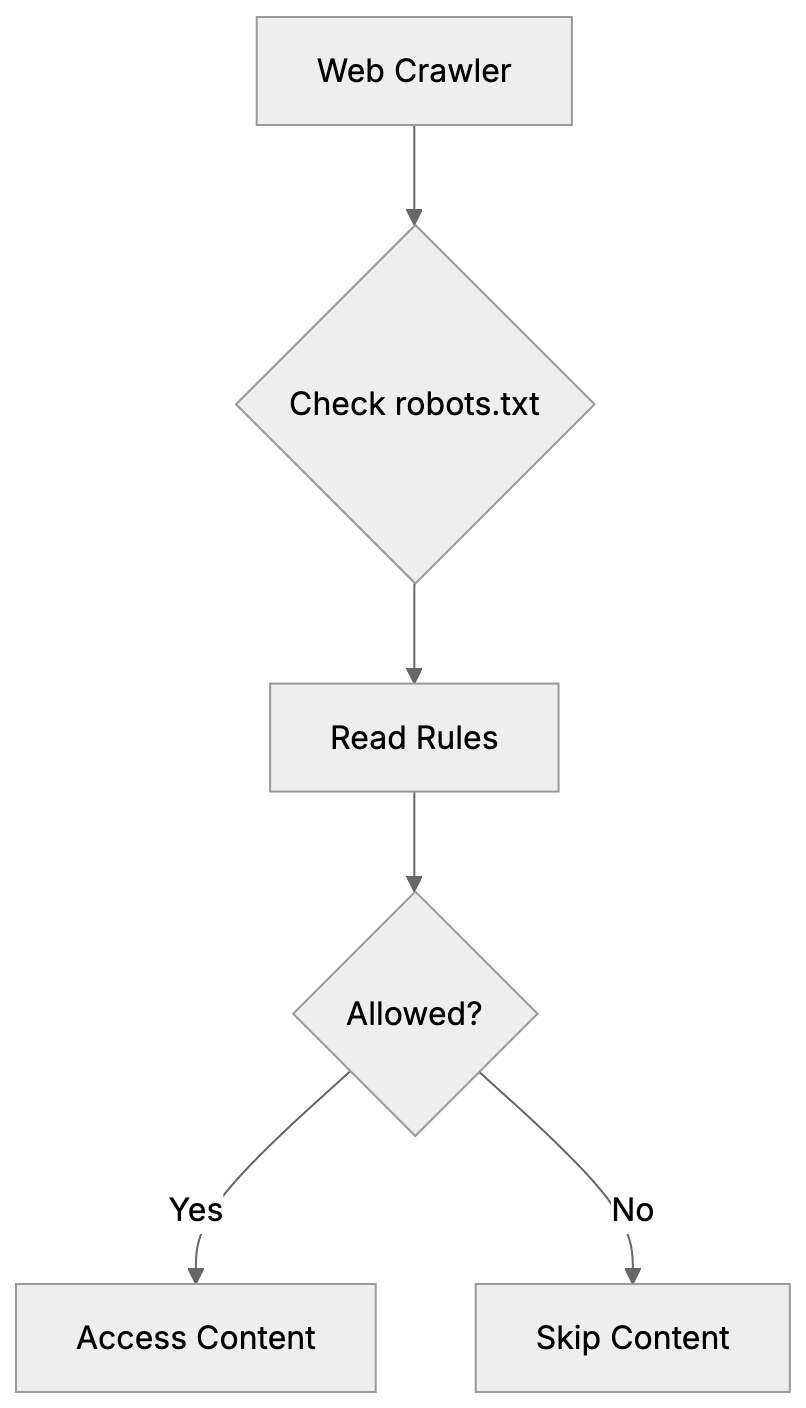
Robots.txt Access Control Overview:
A basic robots.txt structure contains User-agent declarations followed by Allow or Disallow rules. The User-agent line specifies which crawler the rules apply to, while the Disallow line indicates which paths the crawler should avoid. An empty Disallow line signifies no restrictions. The syntax appears as follows:
User-agent: GPTBot
Disallow: /
This tells GPTBot not to crawl any part of your site. The forward slash represents the entire domain. You can also specify particular directories:
User-agent: CCBot
Disallow: /private/
Disallow: /documents/
A common misconception is that User-agent: * controls all crawlers, including AI bots. While * theoretically means “all crawlers,” many AI companies configure their bots to respond only to specific User-agent declarations. As such, you need explicit rules for each AI crawler you wish to block. The generic wildcard often goes ignored by AI bots, even though it works fine for traditional search crawlers.
Robots.txt files are read from top to bottom, meaning the first matching User-agent block applies. If a crawler finds its specific User-agent listed, it follows those rules and ignores the * wildcard section. This underscores the importance of specific declarations for effective AI crawler control.
AI Crawlers You Should Know About
Different AI companies use different crawler names. Some crawlers collect data for training, while others support real-time search features in AI assistants. Understanding which is which aids you in making informed AI bot blocking decisions.
Training crawlers gather content to build and improve AI models, which most website owners want to block if they don’t want their content in training datasets. The main training crawlers include:
- GPTBot: OpenAI’s web crawler for ChatGPT training data.
- Google-Extended: Collects content for Google’s AI models like Gemini.
- CCBot: Operated by Common Crawl for AI research and companies.
- Bytespider: ByteDance’s crawler for AI systems.
- Meta-externalagent: Gathers content for Meta’s AI projects.
- Cohere-ai: Crawls for Cohere’s language models.
Crawler Types and Their Purposes:
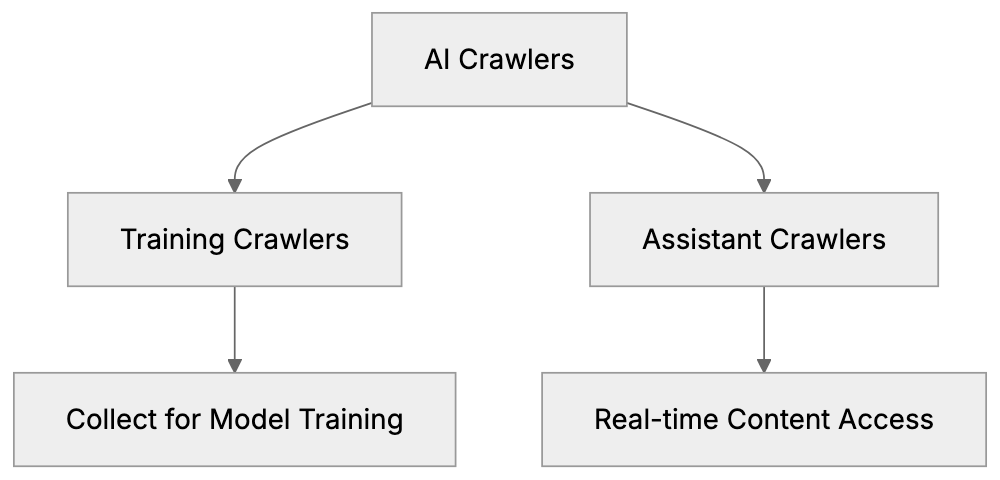
Assistant and search crawlers work differently, fetching content in real-time when users ask questions. Blocking these means AI assistants can’t access your site to answer queries. The main assistant crawlers are:
- OAI-SearchBot: Enables ChatGPT’s browsing feature.
- ChatGPT-User: Appears when ChatGPT users share links.
- ClaudeBot: Powers Claude’s web search capabilities.
- PerplexityBot: Allows Perplexity AI to cite your content in answers.
You might wish to block training crawlers but allow assistant crawlers. This approach permits AI tools to reference your content with attribution while preventing bulk scraping for model training. Or you might choose to block everything if you want no AI interaction at all.
Complete Robots.txt Configuration Examples
Here’s a robots.txt syntax configuration that blocks all major AI training crawlers while allowing traditional search engines:
User-agent: GPTBot
Disallow: /

User-agent: Google-Extended
Disallow: /

User-agent: CCBot
Disallow: /

User-agent: Bytespider
Disallow: /

User-agent: meta-externalagent
Disallow: /

User-agent: cohere-ai
Disallow: /

User-agent: *
Disallow:
The final User-agent: * with an empty Disallow allows all other crawlers, including Googlebot and Bingbot. This configuration prevents AI training while maintaining search engine visibility.
To block training crawlers but allow AI assistants to reference your content:
User-agent: GPTBot
Disallow: /

User-agent: Google-Extended
Disallow: /

User-agent: CCBot
Disallow: /

User-agent: ClaudeBot
Disallow:

User-agent: PerplexityBot
Disallow:

User-agent: OAI-SearchBot
Disallow:

User-agent: *
Disallow:
To block everything, including search engines and all AI:
User-agent: *
Disallow: /
But remember, this blocks legitimate search engines too, which might not be ideal for most public websites.
For selective blocking where certain directories are off-limits:
User-agent: GPTBot
Disallow: /admin/
Disallow: /api/
Disallow: /user-data/

User-agent: *
Disallow: /admin/
Robots.txt Processing Flow:

This configuration keeps sensitive paths away from GPTBot while allowing it to crawl other public content.
Crawlers That Ignore Robots.txt
Not all AI crawlers respect robots.txt AI directives. Some companies have been documented ignoring these rules intentionally or through poor setup.
Bytespider has received reports from multiple website administrators for ignoring robots.txt rules. Despite Disallow directives, the crawler continues accessing blocked paths, indicating inconsistent behavior rather than complete ignorance.
Perplexity faced controversy when investigations showed their crawler, using various User-agent strings, accessed sites that had blocked PerplexityBot in robots.txt for AI crawlers. The company later stated they would improve compliance, but the incident demonstrates that robots.txt isn’t foolproof.
When crawlers ignore robots.txt, you need server-level blocking. This means configuring your web server (Apache, Nginx, etc.) to return 403 Forbidden responses based on User-agent strings. Server-level blocking works even when crawlers don’t check robots.txt because the server refuses the connection before any content is served.
Another approach is firewall-level blocking using IP address ranges, requiring identification of the IP addresses AI companies use for crawling, and blocking them at the network level. This method is more technical and requires ongoing maintenance as IP ranges change.
The robots.txt file remains your first line of defense because compliant crawlers will respect it, but for known violators, you need additional measures.
Propagation Time and Validation
After creating or updating your robots.txt file, changes don’t take effect instantly. Crawlers typically cache robots.txt for 24 hours, meaning a crawler that checked your robots.txt yesterday might not see your new rules until tomorrow.
Most AI companies claim they check robots.txt before crawling, but the refresh interval varies. OpenAI’s documentation suggests GPTBot checks robots.txt regularly but doesn’t specify exact timing. Google-Extended follows Google’s standard crawler behavior with approximately 24-hour cache times. Plan for a full day before expecting changes to impact crawler behavior.
You should validate your robots.txt file to ensure it’s accessible and properly formatted. The simplest validation involves accessing https://yourdomain.com/robots.txt in a browser. You should see the plain text file content. A 404 error indicates the file isn’t in the correct location.
Google Search Console offers a robots.txt tester under the “Crawl” section. While designed for Googlebot, it validates basic syntax and shows how different crawlers interpret your rules, catching common mistakes like incorrect file encoding or path syntax errors.
Online robots.txt validators are also available. These check syntax compliance with the robots.txt standard and identify potential issues. Search for “robots.txt validator” to find current tools.
Monitoring your server logs confirms whether crawlers respect your robots.txt rules. Look for User-agent strings in access logs and check if blocked crawlers continue requesting content. If you see GPTBot in logs after blocking it, either the cache hasn’t refreshed yet or there’s a compliance issue.
Comparison of Major AI Crawlers
Here’s how the major AI crawlers compare in terms of purpose and compliance:
| Crawler Name | Company | Primary Purpose | Robots.txt Compliance | Alternative Block Method |
|---|---|---|---|---|
| GPTBot | OpenAI | Training data collection | Good | Server-level |
| Google-Extended | AI training | Good | Server-level | |
| CCBot | Common Crawl | Dataset building | Good | Server-level |
| Bytespider | ByteDance | Training data | Poor/Inconsistent | Server + IP blocking |
| meta-externalagent | Meta | Training for AI projects | Good | Server-level |
| ClaudeBot | Anthropic | Real-time search | Good | Server-level |
| PerplexityBot | Perplexity AI | Answer generation | Mixed/Controversial | Server + IP blocking |
| OAI-SearchBot | OpenAI | ChatGPT browsing feature | Good | Server-level |
The compliance column reflects documented behavior and community reports. “Good” indicates that the crawler generally respects robots.txt directives. “Poor/Inconsistent” or “Mixed” indicates reported instances of ignoring robots.txt rules.
Additional Considerations
Some AI companies provide opt-out mechanisms beyond robots.txt. OpenAI allows website owners to submit forms requesting exclusion from training datasets. Google offers similar processes for Google-Extended. These forms serve as a backup method when you want to ensure exclusion.
The robots.txt approach is public. Anyone can view your robots.txt file and see which crawlers you’ve blocked. This transparency is inherent to the protocol. If you need private access control, use authentication mechanisms like password protection or IP whitelisting.
Remember, robots.txt only controls automated crawlers. It doesn’t prevent humans from viewing your public content or using it manually. It also doesn’t apply to content that’s already been crawled and stored in datasets. Robots.txt affects future crawling behavior, not past data collection.
Some crawlers support more granular controls through extensions to the robots.txt standard. The Crawl-delay directive tells crawlers to wait between requests, reducing server load. Not all AI crawlers respect Crawl-delay, so test if this matters for your use case.
Consider using the Allow directive, which explicitly permits access to paths that might otherwise be blocked by a broader Disallow rule. This is useful for creating exceptions:
User-agent: GPTBot
Disallow: /
Allow: /public-resources/
This blocks GPTBot from everything except the public-resources directory.
Maintaining Your Robots.txt Over Time
The AI crawler landscape changes frequently. New crawlers emerge as new AI companies launch, and existing crawlers change their User-agent strings or behavior. Your robots.txt requires periodic review to stay effective.
Check AI company documentation quarterly for new crawler announcements. OpenAI, Google, Anthropic, and others publish crawler information in their technical documentation. When a new crawler launches, decide whether to add it to your block list.
Monitor your server logs for unfamiliar User-agent strings. Unknown crawlers might be new AI bots that haven’t been widely documented yet. Research suspicious User-agents and add appropriate rules if needed.
Test your robots.txt after any website platform changes. Content management system updates or server migrations can sometimes affect robots.txt file location or accessibility. A quick test ensures your rules remain active.
Document why you blocked specific crawlers. Six months from now, you might not remember whether you blocked ClaudeBot intentionally or by mistake. A simple comment system (using # in robots.txt) helps:
# Block AI training crawlers
User-agent: GPTBot
Disallow: /

# Allow AI assistants for user queries
User-agent: ClaudeBot
Disallow:
Comments in the robots.txt file are ignored by crawlers but help you maintain the file over time.
Summary
Controlling AI crawler access to your website requires understanding robots.txt syntax and specific crawler behavior. The robots.txt file, placed at your domain root, uses User-agent declarations to control which crawlers can access which content. Generic User-agent: * rules don’t reliably control AI bots because many only respond to specific User-agent names.
Training crawlers like GPTBot, Google-Extended, CCBot, Bytespider, meta-externalagent, and cohere-ai collect content for AI model development. Assistant crawlers like ClaudeBot, PerplexityBot, and OAI-SearchBot enable real-time features in AI chat interfaces. You can block training while allowing assistants or block everything depending on your preferences.
Some crawlers ignore robots.txt directives, requiring server-level or IP-based blocking. Changes to robots.txt take approximately 24 hours to propagate as crawlers cache the file. Validate your robots.txt using browser access and online tools for proper formatting and accessibility. The AI crawler scene evolves constantly, so periodic review and updates keep your robots.txt effective for AI bot blocking.
Frequently Asked Questions
What should I include in my robots.txt file to control AI crawlers?
To control AI crawlers, include specific User-agent declarations for each bot you want to manage along with appropriate Disallow rules. For instance, if you want to block OpenAI’s GPTBot, you would write: User-agent: GPTBotDisallow: /. Ensure that each line is tailored to the crawlers in question.
How can I check if my robots.txt file is functioning correctly?
You can check the accessibility of your robots.txt file by visiting https://yourdomain.com/robots.txt in a web browser. Additionally, tools like Google Search Console offer a robots.txt tester to validate syntax and crawler interpretation.
What happens if an AI crawler ignores my robots.txt directives?
If an AI crawler ignores your robots.txt directives, you may need to implement server-level blocking or firewall solutions to prevent access. This often requires configuring your web server or network to provide a 403 Forbidden response based on specific User-agent strings.
How often do I need to update my robots.txt file?
It’s advisable to review your robots.txt file periodically, especially every few months or after changes to your website structure. New crawlers can appear and existing crawlers may change their User-agent strings, making it important to keep your rules updated.
Can I prevent my content from being used in AI training while still allowing access for search engines?
Yes, you can block specific AI training crawlers while allowing access for legitimate search engines like Googlebot. This can be achieved by defining specific User-agent rules in your robots.txt file that disallow AI training crawlers while leaving the rules for search engines intact.
Is it possible to set up exceptions in my robots.txt file?
Yes, you can use the Allow directive to create exceptions to broader Disallow rules. For example, you can block a bot from accessing most of your site while still allowing it to access specific directories.
What should I do if my site's content is already scraped by AI companies?
If your content is already scraped, using robots.txt won’t retroactively affect it. However, you can explore opt-out options provided by some AI companies to request exclusion from their training datasets. It’s crucial to actively manage your robots.txt file moving forward to minimize future scraping.