Canonical Tag: Prevent Duplicate Content Issues in SEO
Learn how canonical tags tell search engines which page version is original. Prevent duplicate content penalties and consolidate link equity properly.
Table of Contents
- Understanding the Canonical Tag Problem
- What is a Canonical Tag
- Why Canonical Tags Exist and Their Purpose
- How Businesses and Developers Use Canonical Tags
- Common Scenarios Requiring Canonical Tags
- HTML Canonical Tag Implementation
- Canonical Tags vs Alternatives
- Common Canonical Tag Mistakes
- Monitoring and Validating Canonical Tags
- Cross-Domain Canonical Tags
- Canonical Tags for E-commerce Sites
- Impact on Link Equity and Rankings
- Canonical Tags and Site Migrations
- Future of Canonical Tags
- End
- Understanding the Canonical Tag Problem
- What is a Canonical Tag
- Why Canonical Tags Exist and Their Purpose
- How Businesses and Developers Use Canonical Tags
- Common Scenarios Requiring Canonical Tags
- HTML Canonical Tag Implementation
- Canonical Tags vs Alternatives
- Common Canonical Tag Mistakes
- Monitoring and Validating Canonical Tags
- Cross-Domain Canonical Tags
- Canonical Tags for E-commerce Sites
- Impact on Link Equity and Rankings
- Canonical Tags and Site Migrations
- Future of Canonical Tags
- End
Understanding the Canonical Tag Problem
Duplicate content is a significant issue for website owners. When multiple URLs display the same content, search engines struggle to determine which version to rank. This is where the canonical tag becomes essential. The canonical tag is a straightforward HTML element that informs search engines about the main version of a page. It prevents duplicate content SEO issues and ensures your SEO efforts are not in vain. Web developers and SEO experts frequently use this tag to manage content across different URLs. The rel="canonical" attribute is a crucial tool in technical SEO. It consolidates link equity from duplicate pages to your preferred URL. Without proper canonicalization, your pages might compete against each other in search results, resulting in lower rankings and reduced organic traffic.
What is a Canonical Tag
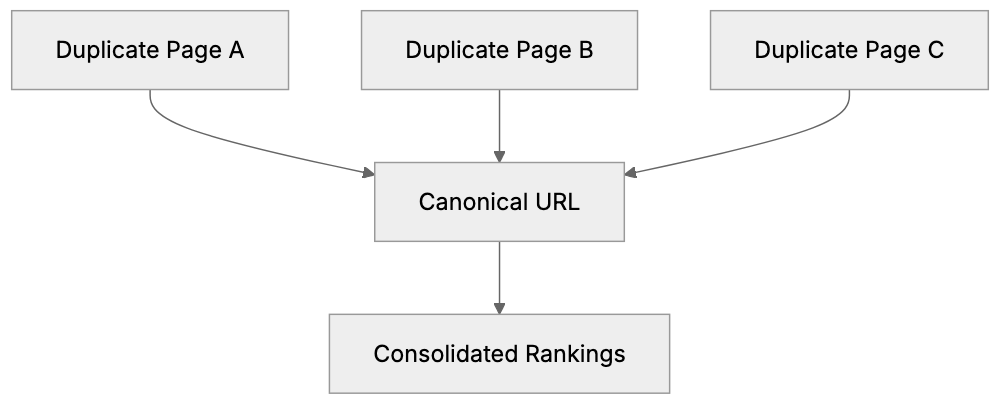
How Canonical Tags Consolidate SEO Signals:
The canonical tag is an HTML element placed in the <head> section of a webpage. It appears like this: <link rel="canonical" href="https://example.com/preferred-page/" />. The tag directs search engines to the original or preferred version of a page. When search engines crawl your site and discover this tag, they know which URL should receive the ranking credit. The canonical link element doesn’t remove duplicate pages from your site; it merely tells search engines which page is the most relevant. You might have the same content on different URLs for legitimate reasons, such as having printer-friendly or mobile versions, or URLs with tracking parameters. The canonical URL ensures all these variations point to one preferred version. This is different from a redirect since the duplicate pages still exist and are accessible to users. The canonical tag guides search engines on which version to index and rank.
Why Canonical Tags Exist and Their Purpose
Canonical Tag Structure:

Websites often unintentionally create duplicate content. E-commerce sites are well known for this. A single product can appear under multiple category URLs. Session IDs and tracking parameters yield unique URLs for the same page. Content management systems may generate multiple URLs for one piece of content. Search engines like Google aim to deliver the best results to users. When they encounter duplicate content, they must decide which version to show. Without a canonical tag, they might choose incorrectly. Worse, they might interpret it as manipulation and penalize your site. The canonical tag addresses this by allowing you to declare your preference to search engines. It consolidates ranking signals from all duplicate versions to your chosen URL. This ensures that backlinks, social shares, and other SEO factors contribute to one page, rather than being divided. For businesses, this results in better search rankings and increased organic traffic. Additionally, the tag helps search engines crawl your site more efficiently, directing resources toward unique content instead of duplicates.
How Businesses and Developers Use Canonical Tags
SEO experts incorporate canonical tags during technical SEO audits. Upon identifying duplicate content issues, adding canonical tags is often the first measure taken. Web developers include canonical tags in website templates to prevent future issues. E-commerce platforms heavily rely on them because product pages often appear under various categories. A shirt might be listed under “men’s clothing,” “summer wear,” and “sale items.” Each URL is distinct, but the content remains identical. The canonical URL aligns all these variations to a single primary product page. Content marketers use canonical tags when syndicating articles to prevent syndicated versions from surpassing the original content in search rankings. Even small business owners benefit from canonical tags, set up by developers or SEO consultants during site launches. These tags work silently in the background, shielding the site from duplicate content issues. Marketing professionals must grasp the importance of canonical tags when running campaigns with tracking parameters. UTM parameters generate unique URLs that could appear as duplicates.
Common Scenarios Requiring Canonical Tags
Duplicate Content Decision Process:
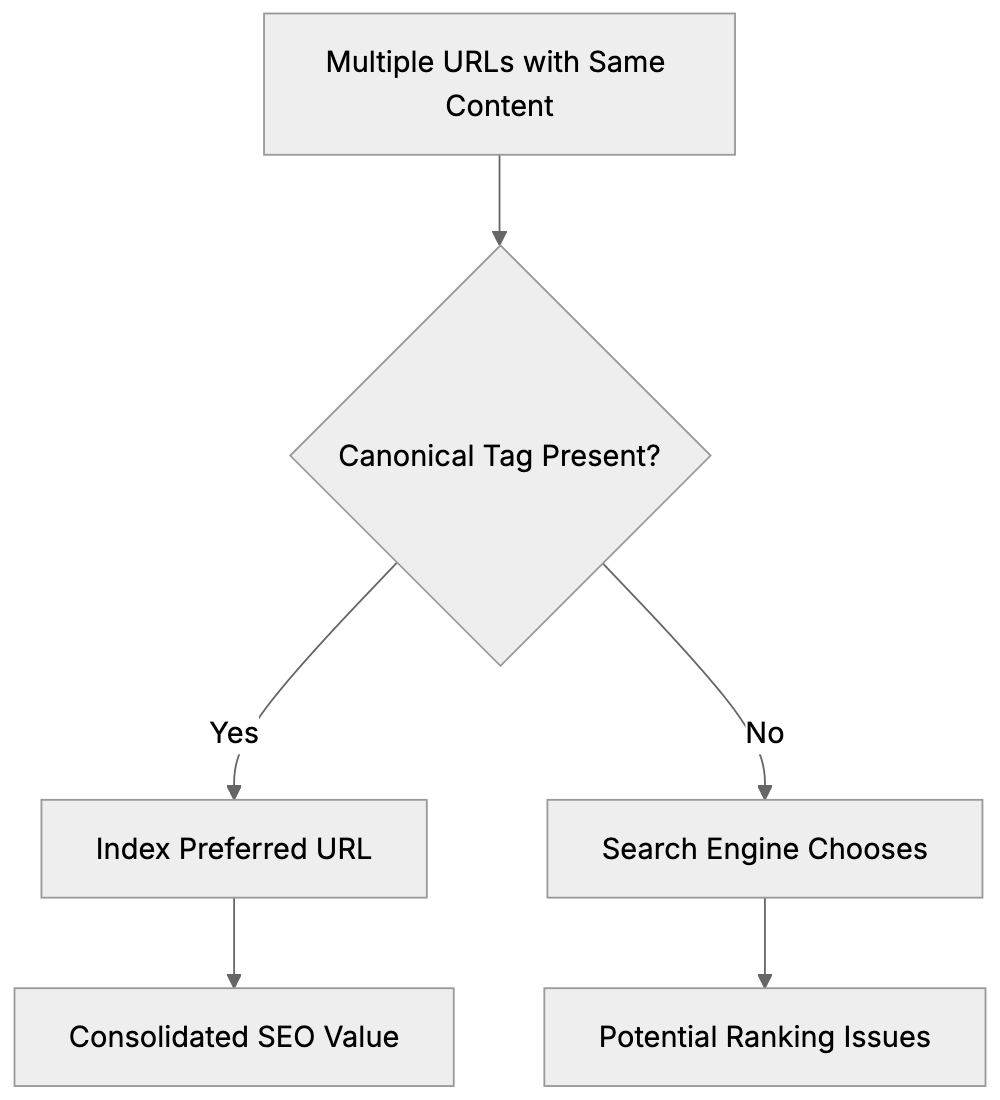
Several scenarios necessitate proper canonicalization. HTTP vs HTTPS versions of your site create duplicates if both are accessible. Similarly, www vs non-www versions generate duplicates. Pagination is another common issue; blog archives and category pages with page numbers might overlap in content. Product variations, such as different colors or sizes, may share descriptions. URL parameters from filters, sorting options, or search features create numerous duplicate URLs. Printer-friendly pages, PDF versions, and AMP pages must have canonical tags pointing to the standard version. A/B testing can spawn temporary duplicates that require canonicalization. Affiliate sites and content aggregators need canonical tags when republishing content from other sources. Mobile-specific URLs (e.g., m.example.com) should canonicalize to the main site if responsive design is not in use. Session IDs appended to URLs are a recurring issue for duplicate content. Canonical tags resolve this by directing all session variations to the clean URL. Regional or language variations might share content and necessitate canonicalization to the primary market version.
HTML Canonical Tag Implementation
Implementing the HTML canonical tag is simple: place it in the <head> section of your HTML document. The syntax is: <link rel="canonical" href="https://www.example.com/page/" />. Always use absolute URLs, not relative ones. Include the full protocol (https://) and domain name. The canonical URL should be the version you want to rank in search results and be accessible, returning a 200 status code. Do not canonicalize to a page that redirects or returns an error. Each page should only have one canonical tag, as multiple tags can confuse search engines and lead them to ignore all of them. The canonical tag should be self-referential on your preferred pages, reinforcing to search engines that this is the version to index. For duplicate pages, the canonical tag points to the preferred version. Avoid chaining canonical tags (e.g., page A canonicalizes to page B, which canonicalizes to page C) as search engines may not follow the chain. Test your setup with Google Search Console or other SEO tools to confirm that search engines recognize your canonical tags.
Canonical Tags vs Alternatives
Different methods address duplicate content, each with its unique implications. Here’s how canonical tags compare:
| Method | Use Case | Difference from Canonical | SEO Impact |
|---|---|---|---|
| 301 Redirect | Permanently moved content | Redirects users and search engines | Passes 90-99% of link equity |
| 302 Redirect | Temporarily moved content | Temporary redirect, doesn’t consolidate signals | May not pass full link equity |
| Noindex Tag | Pages not meant for indexing | Removes page from search results entirely | No ranking benefit, page disappears |
| Parameter Handling | URL parameters in GSC | Google-specific, requires manual configuration | Only works for Google |
| Rel=“alternate” | Mobile/AMP versions | Indicates relationship, not preference | Works with canonical for mobile |
Common Canonical Tag Methods Comparison:
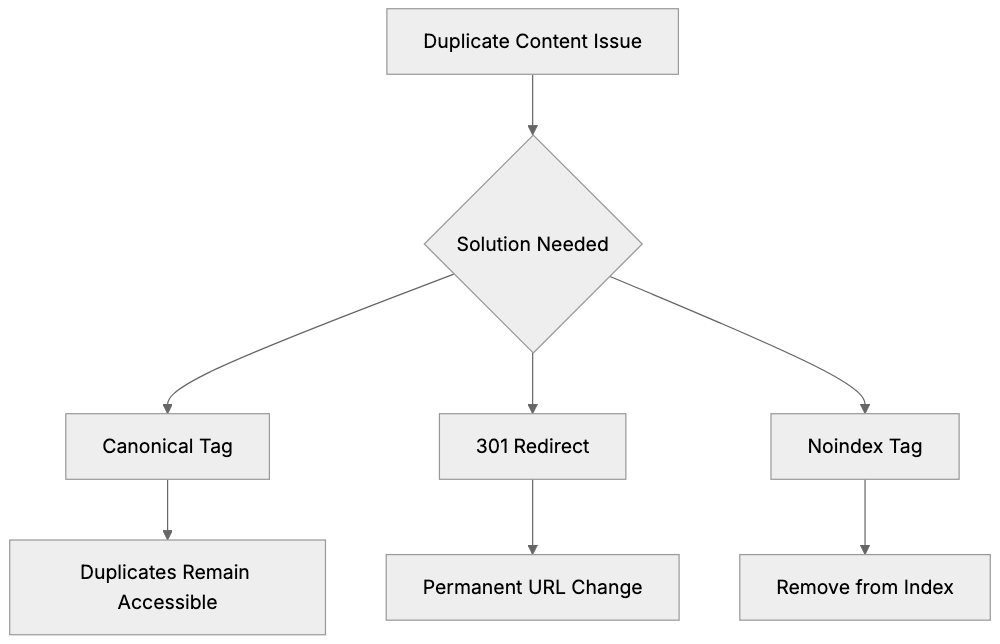
The canonical tag is ideal when you want duplicate pages accessible to users, but need search engines to recognize the preferred version. It is non-intrusive, maintaining user experience. 301 redirects are better when duplicate URLs are unnecessary, as they redirect users to the preferred page. Canonical tags allow duplicates to exist while maintaining SEO. The noindex tag is too severe for most duplicate content cases, removing pages entirely from search results. Instead, use canonical tags unless you genuinely don’t want a page indexed. Parameter handling in Google Search Console works but demands manual setup for each parameter. Canonical tags are more universal and function across all search engines, easier to implement at scale via your CMS or templates.
Common Canonical Tag Mistakes
Many websites implement canonical tags incorrectly, making these common errors: using relative URLs instead of absolute, omitting the full URL with protocol and domain. Pointing canonical tags to non-200 status pages disrupts the signal. If your canonical URL redirects or returns an error, search engines might ignore it. Canonicalizing to paginated pages instead of the main category generates confusion. Mixing HTTP and HTTPS in canonical tags sends mixed signals; maintain protocol consistency. Including canonical tags in the body instead of the head section might result in them being missed by search engines. Creating canonical loops where page A points to B and vice versa confuses crawlers. Skipping self-referential canonical tags on your preferred pages is a missed opportunity. Canonicalizing to URLs blocked by robots.txt is illogical as search engines can’t access the canonical target. Frequent changes to canonical tags reduce trust in your signals. Set them correctly upfront and only change them when necessary.
Monitoring and Validating Canonical Tags
Google Search Console is your best tool for monitoring canonical tag implementation. The Coverage report shows Google’s preferred vs user-declared URLs. The URL Inspection tool indicates whether Google respects your canonical tag or opts for a different one. If Google selects a different canonical than the one you specified, investigate the reason—there may be conflicting signals like redirects or incorrect internal links. Third-party SEO tools like Screaming Frog, Ahrefs, and Semrush can audit your site for canonical tag issues, identifying missing tags, incorrect implementations, and conflicting signals. Schedule regular crawls to detect problems early. Check server logs to see which page versions search engines crawl most. If they continue crawling duplicates despite canonical tags, there might be deeper issues. Monitor rankings for your preferred URLs to ensure they receive credit. If duplicates rank instead of canonicals, setup might be flawed. Testing is vital after implementing canonical tags. Use browser developer tools to inspect the HTML head and verify the tags’ presence and accuracy.
Cross-Domain Canonical Tags
Cross-domain canonical tags signal search engines that content on one domain duplicates content on another. This is common with content syndication. If you publish an article on your blog then republish it on Medium or LinkedIn, the syndicated version should have a canonical tag pointing back to the original. The syntax remains the same: <link rel="canonical" href="https://originaldomain.com/article/" />. This prevents syndicated versions from outranking your original content. Not all platforms allow canonical tag addition. Medium does, but others might restrict HTML head access. Ask platforms to add the canonical tag or include a prominent link to the original instead. Cross-domain canonicals work, but search engines are skeptical and might not honor them if manipulation is suspected. Ensure your original content is published first and supported by strong signals. Press releases, guest posts, and content partnerships often utilize cross-domain canonical tags. Always obtain platform agreements for canonical tag inclusion.
Canonical Tags for E-commerce Sites
E-commerce sites encounter unique duplicate content challenges. Product pages accessed through various category paths create duplicate URLs. A red t-shirt might appear at /mens/tshirts/red-tshirt, /sale/red-tshirt, and /new-arrivals/red-tshirt. These should have canonical tags pointing to a single primary product URL. Filter and sort options generate numerous URL variations. Filtering by size, color, and price range creates unique URLs for essentially the same product list. Implement canonical tags on filtered pages directing to the unfiltered version. Product variations may share descriptions. For separate color or size pages with identical content except for the variant, select one as canonical or create a preferred product page. Some platforms manage this automatically, but others require manual configuration. Check your platform’s SEO settings for canonical tag options. Platforms like Shopify, WooCommerce, Magento, and BigCommerce offer built-in canonical tag features. Configure them during setup. For custom e-commerce solutions, developers should integrate canonical tags in product page templates. Session IDs and tracking parameters from marketing campaigns necessitate parameter handling or canonical tags to prevent duplicate content issues.
Impact on Link Equity and Rankings
Canonical tags consolidate link equity from duplicate pages to your preferred version. When someone links to a duplicate URL, the backlink’s value transfers to the canonical version, concentrating all ranking signals on one page rather than diluting them across duplicates. This results in stronger rankings for your canonical URL. Without canonicalization, you’re competing against yourself, with Google potentially splitting your pages’ authority, resulting in low rankings. Proper canonical tag usage can significantly enhance rankings for competitive keywords. The effect isn’t immediate; search engines require time to recrawl and process canonical signals, taking weeks or months depending on your site’s crawl rate. Monitor rankings during this phase and exercise patience. Link equity consolidation functions even if duplicate pages have different URLs entirely. Provided the canonical tag is present and accurate, search engines attribute the value to your chosen page, making canonical tags effective for managing complex site structures without losing SEO value. Remember, canonical tags are suggestions, not mandates, and search engines might ignore them if they find strong reasons to prioritize an alternate page as canonical.
Canonical Tags and Site Migrations
Site migrations often result in temporary duplicate content situations. During the transition from HTTP to HTTPS, both versions coexist. Implement canonical tags on HTTP pages pointing to HTTPS versions immediately, guiding search engines to the updated secure versions. Domain migrations are more complex. If you’re switching from olddomain.com to newdomain.com, use 301 redirects primarily, with cross-domain canonical tags as a secondary signal. Platform migrations (e.g., moving from WordPress to Shopify) might alter your URL structure. Set up redirects for altered URLs, but use canonical tags for pages that temporarily exist in both locations. Avoid having canonical tags point to URLs that redirect during migrations, as this creates mixed signals. Choose to either redirect or canonicalize, not both. Once migrations conclude and all redirects are established, ensure your canonical tags lead to the final URLs. Update any tags pointing to outdated URLs. Site migrations carry substantial SEO risks, so get canonical tags right from the onset. Thoroughly test within a staging environment before going live, and closely monitor Google Search Console post-migration to detect canonical tag issues early.
Future of Canonical Tags
Canonical tags continue to be integral to technical SEO and will remain critical. Search engines depend on them to interpret complex site structures. As websites adopt more complex technologies like JavaScript rendering, AMP, and progressive web apps, canonical tags become even more indispensable. While Google has improved its ability to identify duplicate content automatically, it still respects explicit canonical signals, granting you control over which versions to rank. Emerging content formats and platforms will necessitate canonical tag consideration. Voice search, AI-generated content, and new social platforms all create potential duplicate content scenarios. The core purpose of the canonical tag—indicating the preferred version to search engines—remains unchanged. However, implementation might evolve with new web technologies. Canonical signals are already supported in HTTP headers for non-HTML resources. Expect more canonicalization methods for app content, API responses, and structured data. In the future, JSON-LD format might incorporate canonical signals too. For now, the HTML canonical link element is the standard, an essential tool for effectively managing duplicate content issues regardless of evolving web technologies.
End
The canonical tag is essential for managing duplicate content and safeguarding your SEO efforts. By correctly implementing the rel="canonical" attribute, you communicate to search engines which version of your content is most important. This averts duplicate content penalties and consolidates link equity to your preferred URLs. Whether you operate an e-commerce site, publish content across various platforms, or manage a complex website structure, canonical tags should be a cornerstone of your technical SEO strategy. The HTML canonical tag is straightforward to implement but requires meticulous attention to detail. Avoid common errors like using relative URLs or linking to error pages. Monitor your configuration through Google Search Console and make adjustments if needed. When used correctly, canonical tags enhance your search rankings by directing all SEO signals to the appropriate pages. They offer a simple solution to a multifaceted problem that every web developer, SEO expert, and site owner should understand and apply.
Frequently Asked Questions
What are the benefits of using canonical tags?
Canonical tags help manage duplicate content by indicating to search engines which version of a page is the original or preferred version. This prevents SEO penalties and consolidates link equity, which can enhance search rankings and drive more organic traffic to the primary URL.
How do I implement a canonical tag on my website?
To implement a canonical tag, place the following line in the `` section of your HTML: ``. Ensure you use an absolute URL and that the canonical URL returns a 200 status code, indicating it is accessible.
Can I have multiple canonical tags on a single page?
No, each page should only have one canonical tag. Multiple canonical tags can confuse search engines and may lead them to ignore all tags. Always ensure that the canonical tag points to the preferred version of the content.
What is the difference between canonical tags and redirects?
Canonical tags inform search engines about the preferred version of a page without removing duplicate pages from visibility. In contrast, redirects automatically send users from one URL to another, completely eliminating access to the original URL. Canonical tags allow multiple pages to exist while specifying which should rank.
How can I monitor the effectiveness of my canonical tags?
You can use tools like Google Search Console to monitor canonical tag implementation. The Coverage report will show you Google's preferred versus user-declared URLs. Regular crawls with third-party SEO tools can also help identify any canonical issues.
What should I do if Google ignores my canonical tag?
If Google is ignoring your canonical tag, investigate potential issues such as conflicting signals from redirects or internal links. Ensure your canonical URL is accessible and returns a 200 status code. It may take time for changes to be recognized, so patience is essential.
Are there specific scenarios where canonical tags are particularly useful?
Canonical tags are particularly useful in e-commerce, where products may appear under multiple categories or have different URLs due to parameters. They are also beneficial for content syndication, pagination issues, and cases where mobile versions or tracking parameters create duplicate content.