Meta Charset Tag: Setting Character Encoding for HTML Pages
Learn why meta charset tag is crucial for displaying text correctly. Understand UTF-8 encoding and how to properly declare character sets in HTML.
Table of Contents
- What Is the Meta Charset Tag and Why It Matters
- Understanding HTML Character Encoding Systems
- How to Properly Declare the Meta Charset Tag in HTML
- Common Problems When Character Encoding Goes Wrong
- Comparing UTF-8 to Alternative Character Encoding Options
- Best Practices for Implementing Character Encoding
- The Technical Details Behind How Browsers Process Character Encoding
- Conclusion
- What Is the Meta Charset Tag and Why It Matters
- Understanding HTML Character Encoding Systems
- How to Properly Declare the Meta Charset Tag in HTML
- Common Problems When Character Encoding Goes Wrong
- Comparing UTF-8 to Alternative Character Encoding Options
- Best Practices for Implementing Character Encoding
- The Technical Details Behind How Browsers Process Character Encoding
- Conclusion
What Is the Meta Charset Tag and Why It Matters
The meta charset tag is a crucial piece of code in HTML that informs web browsers how to read and display text on your pages. UTF-8 is the most common character encoding on the web, supporting a vast range of characters from different languages. Without it, your website might show weird symbols instead of proper letters and characters. This happens because computers need instructions on which character encoding system to use when rendering text.
Character encoding is a system that maps letters, numbers, and symbols to specific numeric codes that computers understand. The most common encoding is UTF-8, which supports practically all languages and special characters worldwide. Web developers need to grasp this tag because incorrect character encoding can break your site’s appearance and hurt user experience.
The meta charset tag usually appears near the top of your HTML document in the head section. MDN Web Docs provides detailed information on the <meta> element and its attributes. It’s a simple one-line declaration, but it prevents major display issues. When browsers encounter this tag, they know exactly how to interpret the bytes of data that make up your webpage text. Small business owners running websites should ensure this tag exists in their HTML to avoid text display problems that can confuse visitors and damage credibility.
Understanding HTML Character Encoding Systems
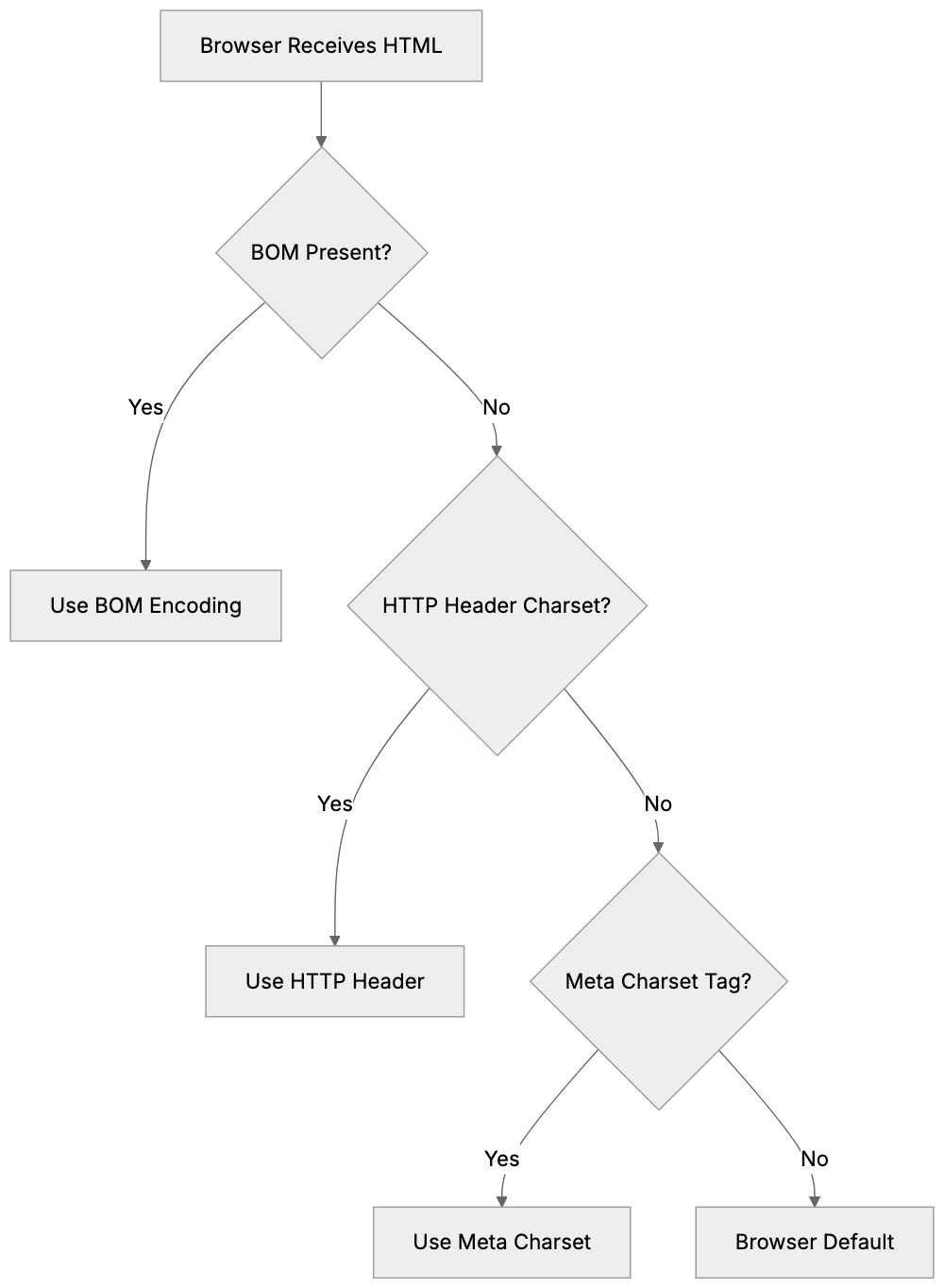
Character Encoding Decision Flow:
HTML character encoding systems have evolved over the years. Early systems like ASCII handled only basic English characters, which worked for English-only websites but failed for other languages.
UTF-8 encoding solved this limitation. It represents over a million characters from virtually every writing system on Earth, including Latin alphabets, Cyrillic, Arabic, Chinese, Japanese, emoji, and special symbols. UTF-8 has become the standard encoding for the web because of its flexibility.
The character set meta tag specifies the encoding system for your HTML document. By using charset=utf-8 in your meta tag, you instruct the browser to apply the UTF-8 system for interpreting the text. This ensures that accented characters, currency symbols, and multilingual content display correctly.
Although other encoding systems exist, they are largely obsolete for modern web development. For example, ISO-8859-1 was common in the past but only supports Western European languages. UTF-16 exists but is rarely used for HTML documents. UTF-8 is the practical choice for nearly all web projects today.
How to Properly Declare the Meta Charset Tag in HTML
Declaring the meta charset tag is straightforward, but placement matters. The tag should appear within the first 1024 bytes of your HTML document, ideally near the top of your head section.
UTF-8 Character Coverage:

The modern HTML5 syntax is simple:
<meta charset="UTF-8">
Place this line right after your opening head tag and before other meta tags or title elements. Some developers put it as the first line inside the head section to ensure browsers see it immediately.
Older HTML versions used a longer syntax:
<meta http-equiv="Content-Type" content="text/html; charset=UTF-8">
Though still valid, the shorter HTML5 version is preferred. It tells the browser to use UTF-8 encoding for the document. While case doesn’t matter for the charset value, most developers use uppercase UTF-8 for consistency.
After adding the meta charset tag, make sure the HTML file is saved with UTF-8 encoding. The meta tag and actual file encoding must match to avoid display problems.
Common Problems When Character Encoding Goes Wrong
Missing or incorrect character encoding leads to visible problems on websites. The most common issue is seeing question marks or replacement characters instead of special characters.
Accented letters often break without proper UTF-8 encoding. Words like café might display incorrectly. This happens when the browser interprets UTF-8 encoded bytes using the wrong character set. European languages with diacritical marks are especially at risk.
Currency symbols and mathematical operators can also fail. The Euro symbol (€), British pound (£), or multiplication sign (×) might render as garbage characters. Emoji and special Unicode characters won’t display at all without UTF-8 encoding.
Comparing UTF-8 to Alternative Character Encoding Options
While UTF-8 dominates modern web development, understanding alternatives helps explain why utf-8 encoding HTML became the standard. Here’s how the main options compare:
| Encoding | Character Support | File Size | Compatibility | Best Use Case |
|---|---|---|---|---|
| UTF-8 | 1,112,064 characters | Variable (1-4 bytes) | Excellent | Modern websites, international content |
| UTF-16 | Same as UTF-8 | Variable (2-4 bytes) | Good | Internal processing, Java/Windows systems |
| ISO-8859-1 | 256 characters | Fixed (1 byte) | Limited | Heritage Western European sites only |
| Windows-1252 | 256 characters | Fixed (1 byte) | Limited | Old Windows applications |
| ASCII | 128 characters | Fixed (1 byte) | Very limited | Plain English text only |
UTF-8 wins for web use because it balances compatibility with complete character support. It’s backwards-compatible with ASCII, which means basic English text uses the same byte values in both systems.
Best Practices for Implementing Character Encoding
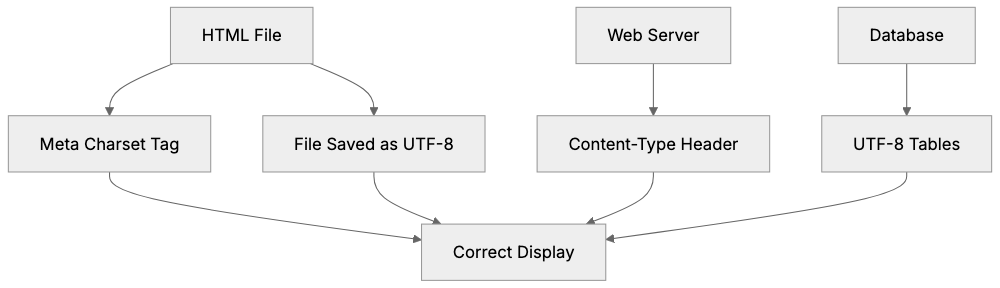
Implementing proper HTML character encoding requires attention to multiple layers of your web stack. The meta charset tag is just one component.
- Always include the meta charset tag in every HTML page, placing it within the first few lines of your head section.
- Configure your web server to send the correct Content-Type header:
Content-Type: text/html; charset=UTF-8. - Save all your HTML, CSS, and JavaScript files with UTF-8 encoding.
- Ensure your database uses UTF-8 encoding for tables and columns.
- Validate your page to check that special characters display properly.
HTML Character Encoding Best Practices:
For marketing professionals, request that all pages include the meta charset declaration to prevent content display issues. Encoding problems can interfere with how search engines read your pages.
The Technical Details Behind How Browsers Process Character Encoding
When a browser loads an HTML page, it determines the character encoding before rendering text by following specific steps.
- The browser checks for a BOM (Byte Order Mark) at the file’s start.
- It looks at the HTTP Content-Type header sent by the server.
- If no charset is in the HTTP header, it scans the first 1024 bytes for a meta charset tag.
- If no encoding information is found, browsers default to behavior that may vary.
The meta charset tag is a reliable fallback when HTTP headers are missing or incorrect. It ensures consistent behavior across all browsers and versions.
Conclusion
The meta charset tag is an essential component of HTML pages ensuring text displays correctly across all browsers and devices. Setting charset=utf-8 in your HTML documents supports international characters, symbols, and emoji while maintaining compatibility with basic English text.
Proper HTML character encoding prevents garbled text and broken special characters. Beyond the meta charset tag, best practices include configuring web server headers and database encoding to use UTF-8. For marketing professionals and small business owners, proper character encoding directly impacts user experience and site credibility. Verifying UTF-8 encoding setup can prevent frustrating display issues.
Frequently Asked Questions
What is the purpose of the meta charset tag?
The meta charset tag informs web browsers about the character encoding used in a webpage. This is crucial for ensuring that text, symbols, and multilingual characters display correctly, preventing issues like garbled text and weird symbols.
How do I include the meta charset tag in my HTML document?
You can include the meta charset tag in your HTML by adding the line `` within the head section of your document, ideally as the first line. This tells the browser to use UTF-8 encoding for interpreting the text.
What are some common issues if I don't use the correct character encoding?
Forgetting to set the correct character encoding can lead to problems like displaying question marks or replacement characters instead of special letters. Accented characters, currency symbols, and emojis may not render correctly, potentially confusing users and harming your website's credibility.
Why is UTF-8 preferred over other character encoding options?
UTF-8 supports over a million characters from various languages, making it suitable for international content. It is backwards-compatible with ASCII and balances character support with file size efficiency, making it the most practical choice for modern web development.
What should I check if special characters are not displaying correctly on my website?
If special characters are not displaying correctly, ensure that your HTML file is saved with UTF-8 encoding and that the meta charset tag is properly included. Additionally, verify that your web server is configured to send the correct Content-Type header.
How can I validate my character encoding setup?
You can validate your character encoding by testing how special characters display on your webpage and using online validators that check your HTML structure. Make sure that accented letters and symbols render correctly across various browsers.
Is using the longer syntax for the meta charset tag still acceptable?
While the longer syntax `` is still valid, the shorter HTML5 version `` is preferred for simplicity and clarity. Utilizing the shorter version enhances readability and maintainability of your HTML code.