HTML Meta Description Tag: Write Descriptions That Get Clicks
Learn how to write meta descriptions that boost click-through rates. Best practices for length, formatting, and SEO optimization explained.
Table of Contents
- What Is a Meta Description Tag
- Why Meta Descriptions Matter for SEO
- How to Write an Effective Meta Description
- Meta Description Length and Technical Details
- Common Meta Description Mistakes to Avoid
- Meta Description Tools and Testing
- Comparing Meta Description Best Practices Across Platforms
- Meta Descriptions for Different Content Types
- Monitoring and Improving Meta Description Performance
- Advanced Meta Description Strategies
- Conclusion
- What Is a Meta Description Tag
- Why Meta Descriptions Matter for SEO
- How to Write an Effective Meta Description
- Meta Description Length and Technical Details
- Common Meta Description Mistakes to Avoid
- Meta Description Tools and Testing
- Comparing Meta Description Best Practices Across Platforms
- Meta Descriptions for Different Content Types
- Monitoring and Improving Meta Description Performance
- Advanced Meta Description Strategies
- Conclusion
What Is a Meta Description Tag
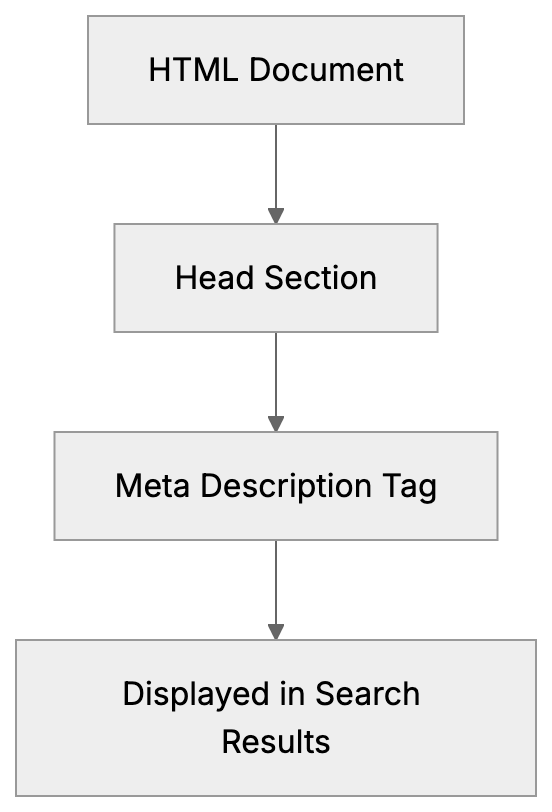
The meta description tag is a snippet of HTML code that summarizes what a webpage is about. Search engines like Google display this text in search results under your page title. Although it doesn’t directly affect your rankings, it plays a crucial role in whether people click on your link.
Think of it as your pitch to searchers. You get around 155 characters to convince someone that your page has what they need. The tag sits in the head section of your HTML and looks like this: <meta name="description" content="Your description goes here">.
Most content management systems make adding meta descriptions easy. Platforms like WordPress, Shopify, and Wix all have fields where you can just type in your description without touching code. However, knowing how to write good ones is where most people struggle.
The meta description tag exists because search engines need a way to quickly inform users about what they’ll find on a page. Without it, Google just grabs random text from your page, which often looks messy and doesn’t make sense. A well-crafted meta description can significantly boost your click-through rate, as it serves as a compelling pitch to searchers.
Meta Description in HTML Structure:
Why Meta Descriptions Matter for SEO
Meta descriptions don’t directly improve your search rankings—Google confirmed this years ago. However, they affect something potentially more important: whether people actually click your result.
Here’s the thing: you could rank number one for a keyword, but if your description is boring or unclear, people will skip right past you. Meanwhile, the site in position three with a strong description gets all the traffic.
Click-through rate (CTR) is a real metric that impacts your site performance. More clicks mean more potential customers or readers. Plus, there’s evidence that a higher CTR can indirectly help rankings over time because it signals to Google that users find your result relevant.
Search engines also use your meta description in other places. Social media platforms often pull it when someone shares your link. Email clients might display it in link previews. So, you’re not just writing for Google—you’re writing for anywhere your URL gets shared.
The purpose is simple: give searchers a clear, accurate preview of your content so they can decide if clicking is worth their time. Do this well, and you’ll see more traffic even without ranking higher.
How to Write an Effective Meta Description
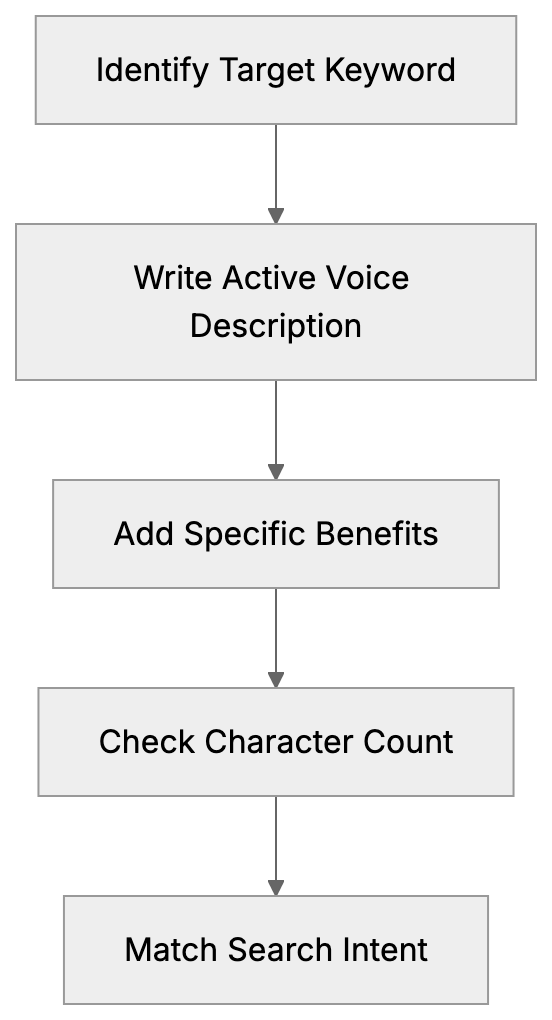
- Start with your target keyword. Include it naturally near the beginning because Google bolds matching terms in search results. This catches attention and shows relevance.
- Keep it under 155 characters. Google cuts off descriptions that run too long. Some studies suggest 150 characters to avoid truncation. Count every character, including spaces and punctuation.
- Write in active voice. Tell people what they’ll get or learn. “Learn how to improve images for faster loading” beats “Image improvement techniques are discussed.” Action words work better than passive descriptions.
- Include a call to action when it makes sense. Words like learn, find, or compare prompt people to click, but don’t force it. The CTA should flow naturally.
- Be specific about what’s on the page. Vague descriptions get ignored. Instead of “Tips for better SEO,” try “5 technical SEO fixes that improved our organic traffic by 40%.” Numbers and specific benefits grab attention.
- Match search intent. If someone searches “how to install WordPress,” they want a tutorial, not a sales pitch. Your description should clearly indicate you have the answer they need.
- Avoid duplicate descriptions across pages. Each page needs its own unique meta description that accurately reflects its specific content.
- Don’t stuff keywords. One or two mentions maximum. Keyword stuffing looks spammy, and Google might just ignore your description.
Meta Description Length and Technical Details
The optimal meta description length sits between 150 and 155 characters. Google’s display limit fluctuates, but this range works consistently across desktop and mobile.
Mobile shows fewer characters than desktop. Google typically displays about 120 characters on phones. So, front-load your most important information to ensure mobile users see it.
The HTML syntax is straightforward. Place this in your page’s head section:
<meta name="description" content="Your description text here">
Use straight quotes, not curly quotes. The name attribute must be “description,” and your actual text goes in the content attribute.
Meta Description Writing Process:
Special characters work fine in meta descriptions. Emojis technically work too, but most SEO experts advise against them. They can display inconsistently across devices and might make your site look less professional.
Google may choose to display content from your page that better matches the search query, which can occur in about 30 percent of searches. You can’t control it, but writing good descriptions reduces how often Google rewrites them.
Content management systems like WordPress, especially with plugins like Yoast SEO, offer built-in character counters and previews to help you stay within optimal length limits. Shopify has a character limit on the field itself. If you’re coding by hand, use an online character counter.
Common Meta Description Mistakes to Avoid
- Leaving the field blank is the biggest mistake. When you don’t provide a meta description, Google pulls random text from your page, usually creating a confusing snippet that reduces your click-through rate.
- Writing descriptions that are too short wastes space. A 50-character description leaves 100 characters of opportunity on the table. Use the full space available to make your case.
- Duplicating descriptions across multiple pages hurts you. Search engines want unique descriptions for each URL. Mass duplicating shows you’re not paying attention to quality.
- Being too vague doesn’t help anyone. “Welcome to our website” or “Quality products and services” tells searchers nothing. Be specific about what makes this particular page valuable.
- Mismatching the description and page content breaks trust. If your description promises “10 free templates,” but the page has three paid templates, people bounce immediately.
- Writing for search engines instead of humans creates robotic descriptions. “Best plumber Chicago affordable plumbing services Chicago IL” might have keywords but reads terribly. Write for people first.
- Ignoring the search intent means wasted clicks. Someone searching “how much does SEO cost” wants pricing information. A description about “why SEO matters” won’t match what they need.
- Using quotation marks can cause display issues. Google cuts off descriptions at quotation marks sometimes. Use alternative punctuation or rephrase to avoid quotes.
Meta Description Tools and Testing
- Yoast SEO is probably the most popular plugin for WordPress users. It provides a dedicated field for meta descriptions, preview shows, and warns when you exceed character limits.
- Rank Math offers similar features to Yoast with additional analysis. It shows a score and suggests improvements to your descriptions.
- SEMrush Site Audit scans your entire site and flags pages with missing, duplicate, or too-long meta descriptions. Helpful for large sites where manually checking every page isn’t practical.
- Ahrefs Webmaster Tools performs similar auditing. Their Site Audit report has a dedicated section for meta description issues. Free for your own sites.
- Google Search Console doesn’t directly show meta descriptions but it shows click-through rate by page. Compare CTR across similar ranking positions.
- Moz Title Tag Preview Tool lets you preview how your title and description look in search results.
- Character counters are widely available online. Search “character counter” and use any of them. Ensure it counts characters, not words.
- A/B testing meta descriptions is possible but tricky. You need significant traffic to get meaningful data. Change one description, wait a few weeks, check CTR in Search Console, then compare.
Comparing Meta Description Best Practices Across Platforms
| Platform | Character Limit | Preview Tool | Bulk Editing | Auto Generation |
|---|---|---|---|---|
| WordPress + Yoast | 155 chars recommended | Yes | No | Optional |
| Shopify | 320 chars max | Yes | No | Yes, if blank |
| Wix | 155 chars recommended | Yes | No | Yes, if blank |
| Squarespace | 300 chars max | Yes | No | Yes, if blank |
| HTML/Custom | 155 chars recommended | External tools | Manual | No |
WordPress with Yoast gives you the most control and guidance. The plugin shows exactly how your snippet looks and warns about common issues. No bulk editing is available, so you have to update pages individually.
Shopify allows up to 320 characters, but Google still only shows about 155. The platform auto-generates descriptions from page content if you leave the field empty. Sometimes decent, often not great.
Wix has improved their SEO features significantly. Their Wiz AI can suggest meta descriptions, but you should review and edit them. The preview tool shows mobile and desktop versions.
Squarespace lets you set descriptions for each page through their SEO panel. The 300-character limit is misleading since search engines cut off around 155 anyway. Their auto-generation pulls from the first text on your page.
Coding meta descriptions manually in HTML gives you complete control but no guardrails. You need external tools to check length and preview appearance.
Meta Descriptions for Different Content Types
- Blog posts should summarize the main benefit or key takeaway. “Learn 7 proven strategies to reduce cart abandonment and recover lost sales” works better than “This post is about cart abandonment.”
- Product pages need to show the main benefit and differentiation. “Wireless noise-canceling headphones with 30-hour battery and premium sound quality” tells shoppers exactly what they get.
- Service pages should address the problem and solution. “Professional WordPress security services. Fix hacks, prevent malware, and protect your site 24/7.” This matches what someone searching for WordPress security help needs.
- Homepage descriptions are tricky. You can’t be too specific, but vague doesn’t work either. Focus on your main value proposition: “Digital marketing agency specializing in SEO and content strategy for SaaS companies.”
- Category pages benefit from describing what’s in the category. “Browse 200+ responsive WordPress themes for business websites. All themes include mobile improvement and support.”
- About pages can be more conversational. “Meet the team behind [Company]. We’ve helped 500+ businesses improve their organic traffic through data-driven SEO.”
- Contact pages are simple: “Get in touch with our team. Phone, email, and live chat support available Monday through Friday, 9 am to 6 pm EST.”
- Landing pages for ads need to match the ad copy closely. If your ad promises a free guide, your meta description should reinforce that same offer.
Monitoring and Improving Meta Description Performance
Google Search Console is your main tool for tracking meta description performance. Navigate to the Performance report and look at CTR by page. Sort by impressions to find high traffic pages with low CTR that need better descriptions.
Compare your CTR to position. A page ranking in position 3 should get roughly 10 percent CTR on average. Much lower? Your meta description probably isn’t strong enough. Much higher? You nailed it.
Meta Description Performance Monitoring Flow:

Check Search Console for the queries triggering your pages. Sometimes Google shows your page for searches you didn’t expect. If the current meta description doesn’t match these queries, consider updating it.
Look at pages with high impressions but low clicks. These are opportunities. Small improvements to the meta description can drive significant traffic increases without needing to rank higher.
Test changes systematically. Pick one underperforming page, rewrite the meta description, wait four weeks, then check if CTR improved. Don’t change multiple pages at once, or you won’t know what worked.
Seasonal updates matter for some businesses. If you sell tax software, your meta descriptions might need updates each year to reflect the current tax year. Same for any time-sensitive content.
Competitor analysis helps too. Search your target keywords and look at the top results. What are they saying in their descriptions? How can you differentiate? Don’t copy, but learn from what works.
Keep notes on what works. If certain phrases or formats consistently perform well for your site, document them. Build a template or guidelines for your team.
Advanced Meta Description Strategies
- Dynamic meta descriptions work well for sites with many similar pages. E-commerce sites with thousands of products can use templates that auto-fill product names, prices, and key features. “Buy [Product Name] for [Price]. [Key Feature]. Free shipping on orders over $50.”
- Structured data can improve your search snippets beyond just the meta description. Review stars, pricing, and availability—these extra details make your result stand out even more. The meta description still matters, but the combo is powerful.
- Local SEO benefits from location-specific meta descriptions. “Plumbing services in Austin TX. Same day emergency repairs, licensed plumbers, 24/7 availability.” The location match increases relevance for local searches.
- Question format descriptions work for informational content. “What causes slow website loading? Find 8 common issues and how to fix them in this complete guide.” This directly addresses the searcher’s question.
- Including numbers and data points increases credibility. “Over 10,000 businesses use our CRM. Rated 4.8 stars from 2,500+ reviews.” Specific numbers are more trustworthy than vague claims.
- Matching description tone to your brand matters. B2B software can be more professional and direct. Consumer brands might be friendlier and more casual. Stay consistent with your overall brand voice.
- Meta descriptions for featured snippets need extra attention. If you’re trying to win a snippet, ensure your meta description also contains a clear, concise answer.
- Multilingual sites need unique descriptions for each language. Don’t just translate the English version word for word. Cultural context and search behavior differ. Write native descriptions for each market.
Conclusion
The meta description tag is one of the simplest yet most impactful elements of on-page SEO. It doesn’t directly affect rankings, but it does influence whether people click your results in search.
Keep descriptions between 150 and 155 characters. Include your target keyword naturally. Write for humans, not robots. Be specific about what value the page provides. Match the search intent behind the query.
Every page needs its own unique meta description. Leaving them blank or duplicating across pages wastes opportunities to increase your click-through rate. Use tools like Yoast SEO, Search Console, and character counters to write and monitor your descriptions.
Test and improve based on performance data. Pages with high impressions but low CTR need better descriptions. Small changes can drive meaningful traffic increases without requiring higher rankings.
The meta description is your elevator pitch to searchers. Make it count.
Frequently Asked Questions
How important is a meta description for my website?
A meta description may not directly influence your search engine rankings, but it plays a major role in attracting clicks to your webpage. An effective meta description can enhance your click-through rate (CTR), which indirectly affects your search rankings over time.
What happens if I leave the meta description field blank?
If the meta description field is left blank, Google will generate a snippet from your page's content, which might be disorganized or unclear. This often results in lower click-through rates as users may not find the auto-generated text appealing.
How do I know if my meta descriptions are effective?
You can track the effectiveness of your meta descriptions through Google Search Console by examining the click-through rates (CTR) of individual pages. Pages with high impressions but low CTRs may need improved descriptions to better communicate value to users.
Is there a specific format for writing meta descriptions?
Meta descriptions should be concise, ideally between 150 and 155 characters. They should start with targeted keywords, use active voice, and clearly convey what the page offers. Avoid vague language and duplicate descriptions across different pages.
Can I use emojis in my meta descriptions?
While technically possible, using emojis in meta descriptions is generally discouraged by SEO experts. Emojis can display inconsistently across devices and might give a less professional impression, potentially confusing users.
What tools can assist in creating and monitoring meta descriptions?
Several tools can help, including Yoast SEO for WordPress, SEMrush for site audits, and Google Search Console for performance tracking. Character counters can also ensure you stay within optimal length limits for your descriptions.
How often should I update my meta descriptions?
Regular updates may be necessary, especially for seasonal or timely content. Additionally, if you observe that a page has high impressions but low CTR, it's a good opportunity to revise the meta description to attract more clicks.