Meta Robots Tag: Control Search Engine Indexing
Learn how to use meta robots tags like noindex and nofollow to control how search engines crawl and index your web pages.
Table of Contents
- Understanding Meta Robots Tags
- What Is the Meta Robots Tag
- Why Meta Robots Tags Exist
- Common Meta Robots Directives
- How to Implement Meta Robots Tags
- Targeting Specific Search Engines
- Meta Robots vs Robots.txt
- Common Use Cases
- Google-Specific Directives
- Comparison with Alternative Methods
- Testing and Validation
- Impact on SEO Performance
- End
- Understanding Meta Robots Tags
- What Is the Meta Robots Tag
- Why Meta Robots Tags Exist
- Common Meta Robots Directives
- How to Implement Meta Robots Tags
- Targeting Specific Search Engines
- Meta Robots vs Robots.txt
- Common Use Cases
- Google-Specific Directives
- Comparison with Alternative Methods
- Testing and Validation
- Impact on SEO Performance
- End
Understanding Meta Robots Tags
The meta robots tag is an HTML element that tells search engines how to treat your web pages. This small piece of code sits in the head section of your HTML and gives direct instructions to search engine crawlers like Google and Bing. Google’s documentation provides detailed information on implementing the robots meta tag. Think of it as a traffic controller for your website. Wikipedia’s article on meta elements offers a comprehensive overview of their role in web development. It decides which pages get indexed, which links get followed, and how your content appears in search results.
For web developers and SEO experts, the robots meta tag is essential. Rank Math’s SEO Glossary offers insights into its significance and usage. It gives you precise SEO control over search engine indexing without needing access to server files. Small business owners can use it to hide duplicate content, prevent test pages from appearing in search results, or control which pages drive organic traffic. Marketing professionals rely on these tags to shape their site’s search presence and protect sensitive or unfinished content from public view.
What Is the Meta Robots Tag
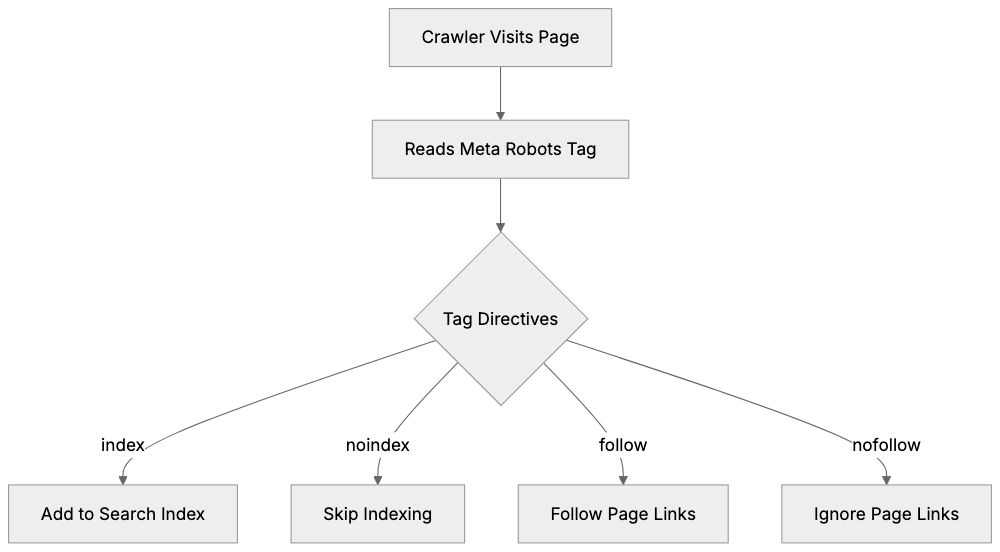
The meta robots tag is a snippet of HTML code placed in the head section of a webpage. It looks like this:
<meta name="robots" content="noindex, nofollow">This tag communicates directly with search engine bots. When a crawler visits your page, it reads this tag before doing anything else. The instructions in the content attribute tell the bot what actions it can and cannot take.
Meta Robots Tag Workflow:
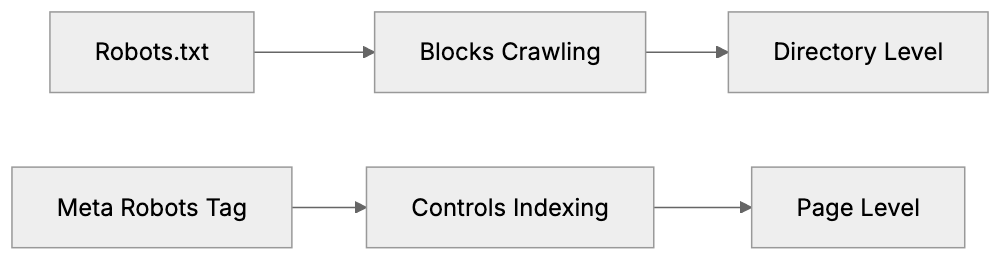
The tag differs from the robots.txt file. While robots.txt controls crawler access at the domain or directory level, the robots meta tag works at the individual page level. This makes it more precise for specific pages. You can target all search engines or specific ones like Google using variations of the tag.
The basic syntax includes the name attribute (which crawler to target) and the content attribute (what instructions to give). You can combine multiple directives in one tag, separated by commas. The tag must be placed in the HTML head section to work properly. Search engines ignore tags placed in the body or footer.
Why Meta Robots Tags Exist
Search engines need guidance on how to handle different types of content. Not every page on your site deserves to be in search results. Some pages exist for functionality, testing, or internal use only.
The meta robots tag solves several problems:
- Prevents duplicate content issues by hiding alternate versions of pages. E-commerce sites use it to hide filtered product pages that create duplicates.
- Protects private or sensitive pages that should not appear in public search results.
- Allows sites under development to keep unfinished pages hidden.
- Helps content marketers manage their SEO strategy by hiding thin content pages that might hurt overall site quality.
- Prevents search engines from following certain links that pass authority to less important pages and stops search engines from caching pages with time-sensitive content.
The tag also helps with technical SEO. It allows precise control without modifying server configurations. This is useful for sites on shared hosting where server access is limited. Developers can start changes quickly without waiting for server file updates. The tag works immediately once the page is crawled, unlike some server-level directives that may have delays.
Common Meta Robots Directives
The robots meta tag supports several directives, each telling search engines to perform or avoid specific actions:
-
noindex: This directive is probably the most used. It tells search engines not to include this page in their index. The page won’t appear in search results, but search engines can still crawl the page and follow links on it. Use this for pages you want hidden from search but that contain important internal links.
-
nofollow: This tells search engines not to follow any links on the page. The crawler will not pass authority to linked pages. This is different from the nofollow attribute on individual links. The meta tag affects all links on the page at once.
-
noarchive: Prevents search engines from storing a cached copy of your page. Users won’t see a cached link in search results. This is useful for pages with frequently changing content or sensitive information.
-
nosnippet: Stops search engines from showing a description or snippet in search results. Your page might still appear, but without preview text. This also prevents cached links from appearing.
-
index and follow: These are the default behaviors. You don’t need to specify them unless you want to be explicit. Some developers include them for clarity.
-
all: Equivalent to index and follow combined. none is equivalent to noindex and nofollow combined. These are shorthand options.
You can combine directives like this:
<meta name="robots" content="noindex, follow">Meta Robots Tag vs Robots.txt:
This tells search engines to not index the page but still follow its links.
How to Implement Meta Robots Tags
Adding a robots meta tag to your page is straightforward. Place the tag in the HTML head section, before the closing head tag.
For a single page, add the code directly:
<!DOCTYPE html>
<html>
<head>
  <meta name="robots" content="noindex, nofollow">
  <title>Your Page Title</title>
</head>
<body>
  <!-- page content -->
</body>
</html>
For WordPress sites, you can use SEO plugins like Yoast or Rank Math. These plugins add a settings box to each post and page. You can select noindex or nofollow options without touching code. The plugin generates the meta tag automatically.
For programmatic setup, use your site’s template system. In PHP, you might add conditional logic:
if ($page_should_be_noindexed) {
  echo '<meta name="robots" content="noindex">';
}
Most content management systems offer plugins or built-in options. Shopify has apps for meta tag management. Wix and Squarespace have settings in their SEO panels.
To verify your setup, view the page source in your browser. Right-click on the page and select View Page Source. Look for your meta tag in the head section. You can also use Google Search Console to check how Google sees your pages.
Remember, changes are not instant. Search engines need to recrawl your page to see the new tag. This can take days or weeks depending on your site’s crawl frequency.
Targeting Specific Search Engines
You can create meta robots tags for specific search engines. The name attribute controls which crawler follows the instructions.
-
For Google only:
<meta name="googlebot" content="noindex"> -
For Bing only:
<meta name="bingbot" content="nofollow">
You can use multiple tags on the same page. Each search engine follows the tag with its name. If no specific tag exists, they follow the general robots tag.
<meta name="robots" content="index, follow">
<meta name="googlebot" content="noindex">
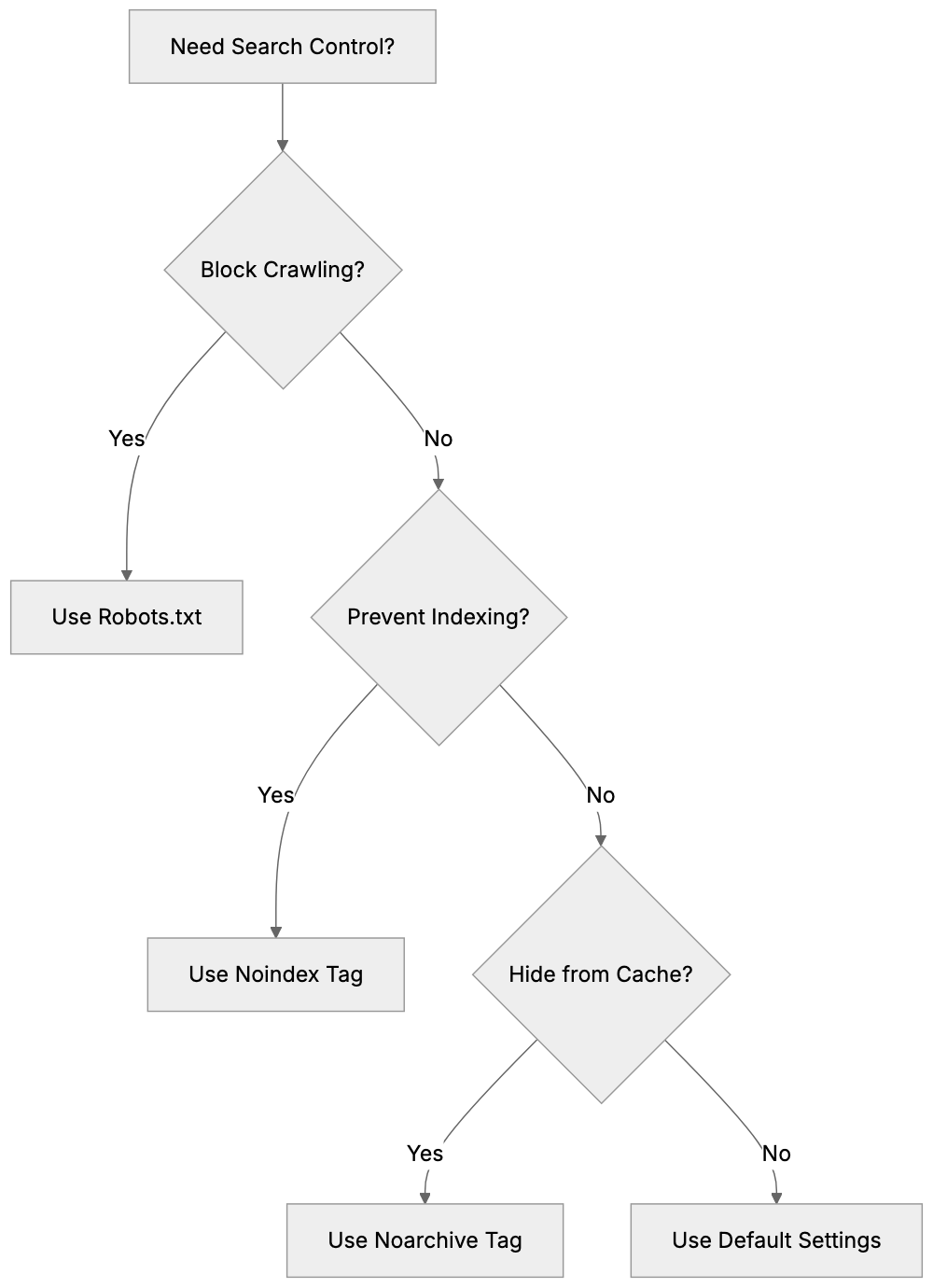
Content Control Decision Flow:
In this example, Google will not index the page, but other search engines will.
Most sites use the general robots tag. Specific targeting is useful when you want different behavior across search engines. This is rare but helpful for regional content or search engine-specific issues.
Meta Robots vs Robots.txt
Both tools control search engine behavior, but they work differently. Understanding when to use each one is important for SEO experts and web developers.
- Robots.txt is a file in your site’s root directory. It blocks crawlers from accessing entire sections or file types. The meta robots tag works on individual pages and controls indexing behavior.
- Robots.txt prevents crawling. If a crawler is blocked by robots.txt, it never sees your page content. The meta robots tag requires the crawler to visit the page. The crawler reads the tag, then follows its instructions.
Use robots.txt when you want to block crawlers entirely. This saves crawl budget and server resources. Use it for admin areas, search result pages, or resource-heavy sections.
Use meta robots tags when you want crawlers to see the page but not index it. This is useful for pages with important internal links. The crawler follows those links and discovers other pages.
You cannot use robots.txt to prevent indexing reliably. If other sites link to a blocked page, search engines might still index it based on those external links. They just won’t know what the page contains. The meta robots tag provides guaranteed noindex control.
Some scenarios need both tools. Block a section with robots.txt to save crawl budget. Use meta robots tags on individual pages within allowed sections for precise control.
Common Use Cases
Different types of sites use meta robots tags for specific purposes.
- E-commerce sites use noindex for filtered product pages. When users filter by color, size, or price, new URLs are created. These create duplicate content. Adding noindex to filtered pages keeps only the main product pages in search results.
- Blogs use noindex for author archives and date archives. These pages often have duplicate content from category pages. Noindexing them prevents competition between similar pages.
- Membership sites use noindex for login pages and member areas. These pages should not appear in public search results. The tag keeps them private while allowing crawlers to find linked pages.
- Development and staging sites need noindex on all pages. This prevents test content from appearing in search results. Add a site-wide noindex tag during development, then remove it at launch.
- Thank you pages after form submissions often get noindexed. These pages have little SEO value and should not appear in organic search. Users should only see them after completing an action.
- Pagination pages sometimes get noindexed to consolidate ranking signals. Some SEO strategies prefer to keep only page 1 indexed while noindexing pages 2, 3, and beyond.
- PDF files and downloadable resources may use noarchive. This prevents search engines from caching the content while keeping it discoverable.
Google-Specific Directives
Google supports additional directives beyond the standard set. These give extra control over how content appears in Google search.
-
max-snippet controls the length of text snippets in search results. You can set a character limit:
<meta name="robots" content="max-snippet:100">This limits snippets to 100 characters. Use -1 for no limit or 0 to prevent snippets entirely.
-
max-image-preview controls image preview sizes. Options are none, standard, or large:
<meta name="robots" content="max-image-preview:large"> -
max-video-preview sets the maximum video preview length in seconds:
<meta name="robots" content="max-video-preview:30"> -
notranslate tells Google not to offer translation for this page in search results.
-
noimageindex prevents images on the page from being indexed. The page itself can still be indexed, but its images won’t appear in Google Images.
These directives only work for Google. Other search engines ignore them. You can combine them with standard directives:
<meta name="robots" content="index, follow, max-snippet:150, max-image-preview:large">Comparison with Alternative Methods
Several methods exist to control search engine indexing. Here is how they compare:
| Method | Scope | Setup | Speed | Use Case |
|---|---|---|---|---|
| Meta Robots Tag | Individual pages | HTML head section | Fast | Precise page control |
| Robots.txt | Directories/site sections | Root directory file | Fast | Block crawling entirely |
| X-Robots-Tag | HTTP header level | Server configuration | Medium | Non-HTML files (PDFs, images) |
| Noindex in HTTP Header | HTTP response | Server configuration | Medium | Programmatic control |
| Canonical Tag | Page relationships | HTML head section | Slow | Duplicate content consolidation |
The X-Robots-Tag works through HTTP headers. It is useful for non-HTML files like PDFs or images. The syntax is similar but lives in server configuration:
X-Robots-Tag: noindex, nofollowCanonical tags tell search engines which version of a page is preferred. They don’t prevent indexing, but consolidate ranking signals. Use them when you want duplicate pages to exist but point to a primary version.
Password protection removes pages from search entirely. If a page requires login, crawlers cannot access it. This is more secure than noindex for truly private content.
Each method has strengths. Meta robots tags offer the best balance of ease and precision for most use cases. They require no server access and work immediately after crawling.
Testing and Validation
After implementing meta robots tags, you should verify they work correctly.
-
View your page source in any browser. Right-click and select View Page Source. Search for “robots” in the head section. Your tag should appear exactly as you coded it.
-
Use Google Search Console URL Inspection tool. Enter your page URL. Google shows how it sees your page, including meta tags. Look for the robots meta tag in the crawl information.
-
The Screaming Frog SEO Spider tool can crawl your site and report all meta robots tags. This is useful for auditing large sites. The tool shows which pages have which directives.
-
Browser extensions like SEO Meta in 1 Click display meta tags for any page you visit. Install the extension and click it while on your page. It shows all meta tags including robots directives.
To test if noindex is working, search Google for your page using site:yourdomain.com/page-url. If the page is noindexed and Google has recrawled it, it should not appear. Remember, this takes time. Google needs to recrawl the page after you add the tag.
Common mistakes to check for include placing the tag outside the head section, typos in directive names, and conflicting directives. Also, verify that you are not blocking the page in robots.txt while trying to use meta robots tags. If robots.txt blocks the page, crawlers never see your meta tag.
Impact on SEO Performance
Meta robots tags directly affect your search visibility. Using them correctly improves SEO. Using them wrong can remove pages from search results.
-
Noindexing low-quality pages can improve overall site quality scores. Google evaluates sites based on average content quality. Removing thin pages from the index can boost rankings for your important pages.
-
Noindexing duplicate content prevents keyword cannibalization. When multiple similar pages compete for the same keywords, they split ranking potential. Noindexing duplicates consolidates signals to one preferred page.
-
Improper use of noindex can destroy organic traffic. If you accidentally noindex important pages, they disappear from search results. Always double-check which pages have noindex tags. Regular audits prevent mistakes.
-
The nofollow directive affects internal link equity distribution. If you nofollow all links on a page, you stop passing authority to linked pages. This can hurt the ranking potential of those pages. Use nofollow carefully and only when needed.
-
Pages with noindex can still contribute to SEO indirectly. Search engines crawl them and follow links. This helps with site architecture and page discovery. A noindexed category page can still help search engines find all product pages it links to.
Monitor your indexed page count in Google Search Console. Sudden drops may indicate accidental noindex setup. Track organic traffic to pages where you add meta robots tags. Verify that changes match your expectations.
End
The meta robots tag gives you precise control over search engine indexing. This HTML element in your page head section tells crawlers whether to index your page and follow your links. Common directives like noindex and nofollow let you shape how your site appears in search results.
Web developers and SEO experts use these tags daily. They prevent duplicate content issues, hide test pages, and manage crawl budget. The tag works at the individual page level, making it more precise than robots.txt for specific pages. Setup is simple through direct HTML editing or CMS plugins.
Understand the difference between noindex and blocking in robots.txt. Use meta robots tags when you want crawlers to see your page, but not index it. Use robots.txt when you want to block crawling entirely. Combine both tools for complete search engine control. Regular testing and validation make sure your tags work as intended and protect your organic search performance.
Frequently Asked Questions
What does the meta robots tag do?
The meta robots tag is an HTML element that instructs search engine crawlers on how to treat specific web pages. It can dictate whether a page should be indexed or if links on the page should be followed.
How do I add a meta robots tag to my website?
To add a meta robots tag, place the code snippet in the HTML head section of your webpage before the closing head tag. Alternatively, content management systems like WordPress offer plugins that simplify this process, allowing you to set indexing options without coding.
Can I target specific search engines with meta robots tags?
Yes, you can create separate meta robots tags for specific search engines. By using the appropriate name attribute (like 'googlebot' or 'bingbot'), you can provide tailored instructions to each crawler.
What is the difference between a meta robots tag and robots.txt?
The meta robots tag and robots.txt serve different purposes. While robots.txt prevents crawlers from accessing entire directories or files, the meta robots tag manages indexing and link-following behavior at the individual page level.
How can I verify if my meta robots tag is working?
To verify your meta robots tag, you can view the page source in your browser and search for the robots tag in the head section. Additionally, tools like Google Search Console can show how Google sees your page, including any meta tags.
What should I do if I accidentally noindex an important page?
If an important page is accidentally marked as noindex, you should remove the noindex tag and make sure to monitor it in Google Search Console. It may take time for search engines to recrawl the page and update the index.
Are there any alternative methods to control indexing?
Yes, aside from the meta robots tag, you can use the robots.txt file, X-Robots-Tag in HTTP headers, and canonical tags. Each method has its own use cases and advantages, so it’s important to choose according to your specific needs.