G2 CRM Reviews and Rankings: Evaluation Guide
Table of Contents
- G2 CRM data needs interpretation
- What the G2 CRM category page shows for CRM evaluation
- How the G2 Grid and CRM rankings work
- Evaluate CRM reviews for sample size, recency and reviewer fit
- Check CRM review verification, incentives and quality
- Test feature fit during CRM evaluation
- Compare G2 Crowd CRM software review data with other sources
- Conclusion
- G2 CRM data needs interpretation
- What the G2 CRM category page shows for CRM evaluation
- How the G2 Grid and CRM rankings work
- Evaluate CRM reviews for sample size, recency and reviewer fit
- Check CRM review verification, incentives and quality
- Test feature fit during CRM evaluation
- Compare G2 Crowd CRM software review data with other sources
- Conclusion
G2 CRM data needs interpretation
A G2 CRM category page streamlines initial CRM research by combining product listings, ratings, review counts and filters. Buyers can use the data to identify candidates. They should not treat the order as a universal verdict.
CRM products handle customer records and sales, often with reporting, workflow automation and integrations. Yet products in the same category can target very different users. A five-person agency and a global sales team will not test the same workload.
This guide explains how to assess G2 categories and reviews by sample size, age, company size, incentives, verification, feature fit and hands-on trials. AI researchers can apply the same process when studying review datasets or ranking systems.
TL;DR: Use G2 CRM evidence and CRM reviews as inputs, not universal verdicts. Then test whether that software review data matches your own operating conditions.
| Data shown | Useful question | Main risk |
|---|---|---|
| Average rating | Do similar users report good results? | Different user groups get merged |
| Review count | Is the score based on enough observations? | A large sample can still contain bias |
| Grid position | How does G2 score the product in this category? | The position is relative and can change |
| Review text | Which problems appear in real use? | One account may not represent your use case |
| Company segment | Does the reviewer work at a similar company? | Employee count does not record technical complexity |
Source page reviewed in Chrome during article research. Follow the image link for the current page.
What the G2 CRM category page shows for CRM evaluation
The G2 CRM category page acts as a product discovery index. The page checked for this article in July 2026 displayed 1,071 CRM listings. It also offered Small Business, Mid-Market and Enterprise segment filters. Buyers could filter by rating and sort the list by G2 Score.
Because G2 can add, remove or recategorize products, record the access date when citing the listing count.
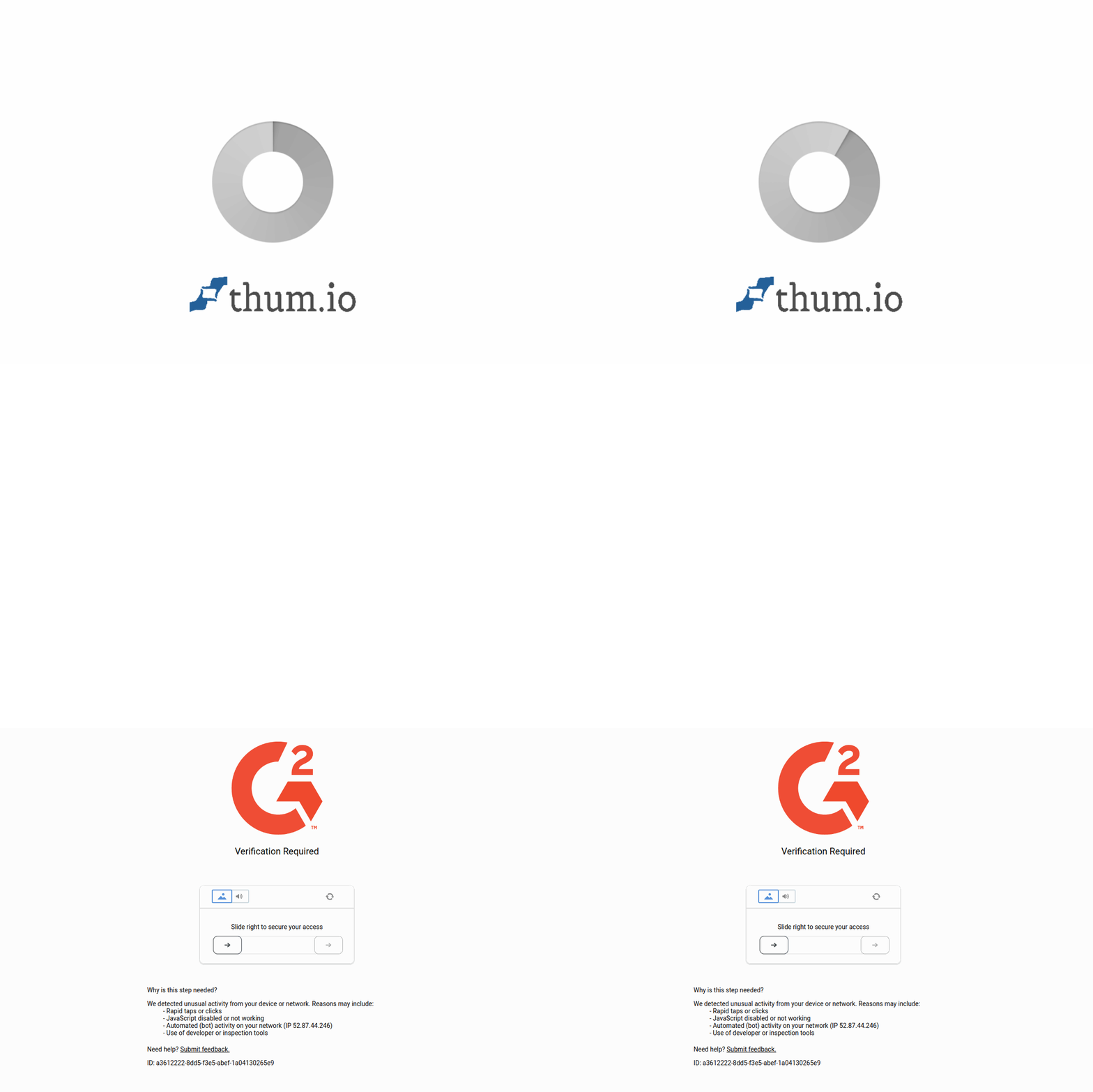
Source screenshot: G2 CRM category page. The live page may change after publication.
A category page shows products G2 places in a defined software category, not whether every system supports your workflow.
G2 requires products to meet a category’s defined feature requirements. Its categorization methodology also says category product lists use G2 Score as the default sort. Buyers can choose other supported sorting options on relevant pages.
The category remains broad: one CRM may focus on sales pipelines, while another connects sales, marketing and service. Some products may need major configuration before they match a technical workflow.
Start by checking the category boundary:
- Read the category definition and inclusion requirements.
- Check whether a product appears in several related categories.
- Identify the exact module reviewed by users.
- Confirm whether reviews cover the current product name.
- Note any recent merger or product packaging change.
This matters because a broad platform’s G2 Crowd CRM rating may mix opinions about different modules, making a precise label mask varied experiences.
How the G2 Grid and CRM rankings work
A G2 Grid ranks CRM products using Satisfaction and Market Presence, not one simple average. Satisfaction draws from user review data. Market Presence combines review data with public and third-party inputs.
G2 lists factors such as review volume, review quality and review age in its research guidelines. It also states that Satisfaction scores are normalized for each Grid. Market Presence inputs are normalized by category and segment.
Normalization makes a score relative to products in the selected group, not an absolute measure of CRM quality. Changing segments can change the comparison set and position.
G2 also compounds review decay daily, reducing weight by about 3% per month or 30% per year and giving newer reports more influence.
Buyers should distinguish what each axis measures.
| Grid signal | What it can indicate | What it cannot establish |
|---|---|---|
| Satisfaction | Reported user sentiment inside the G2 dataset | Performance in your deployment |
| Market Presence | Relative vendor and product presence | Better feature fit |
| Segment Grid | Experiences from one company-size group | Similar architecture or regulations |
| Recent movement | Changes in current inputs | A durable product trend |
Strong Market Presence does not preclude a smaller product from fitting better, while satisfaction from simple deployments may not transfer to a complex data stack.
For AI research or CRM evaluation, treat a G2 Grid position as a derived variable, not a ground-truth label. The score depends on platform taxonomy, sampled reviewers and unpublished weights; G2 discloses input types but not every internal weight.
Store this context:
- Category name
- Market segment
- Collection date
- Visible review count
- Rating or score
- Sort method
- Grid edition when applicable
Without those fields, another researcher may not reproduce the observation.
Evaluate CRM reviews for sample size, recency and reviewer fit
An average hides its distribution: a 4.5 from 20 reviews has less statistical support than a 4.5 from 2,000, though volume alone solves little. A large sample can overrepresent one region, company type or acquisition campaign.
Use review count as a confidence signal, not proof of representativeness, and inspect review recency.
Releases and packaging updates can change APIs, limits, interfaces and automation, making old complaints obsolete and old praise unrepresentative.
Follow this sequence for each G2 CRM candidate:
-
Record the total visible review count.
-
Read a mix of recent positive and negative reviews.
-
Compare recent comments with older comments on the same issue.
-
Look for repeated details across independent accounts.
-
Check whether the reviewer used the current product version or module.
Compare the evidence behind ratings: ten specific reports of unreliable data sync can matter more than hundreds of brief comments about ease of use.
Company size affects review meaning. G2 defines these segments:
- Small Business: 50 or fewer employees
- Mid-Market: 51 to 1,000 employees
- Enterprise: 1,001 or more employees
These groups are rough proxies: a 40-person AI company may process more data than a 500-person services firm, while headcount reveals little about event volume, model operations or integration depth.
AI researchers and software teams should match reviews on operational features:
| Context field | What to compare |
|---|---|
| Data volume | Records, API calls and update frequency |
| User roles | Sales users, admins, developers and analysts |
| Integration stack | Email, warehouse, support and marketing systems |
| Governance | Access controls, audit needs and retention rules |
| Automation | Workflow count and failure handling |
| AI use | Model controls, data access and human review |
Prefer reviews explaining the task, deployment and result; generic praise or criticism offers little evidence.
Check CRM review verification, incentives and quality
G2 says it automatically filters and manually moderates every published review. Its review authenticity documentation describes login checks, manual review and optional screenshot verification. Reviewers can upload private screenshots to support current use.
Visible labels such as Validated Reviewer, Current User and Incentivized provide context but do not make a personal account an independent product test.
G2 permits incentives for approved reviews, so handle them carefully. Its community guidelines say the reward cannot depend on a positive opinion. The same rules cap an incentive at $100 and require G2 to label confirmed incentivized reviews.
Incentives may attract users who would not otherwise review, while vendor outreach may target particular customers at particular times. Both create selection effects without requesting positive scores.
Check these factors before accepting a claim:
| Item | What to check | Why it matters |
|---|---|---|
| Reviewer label | Validated identity or current-user evidence | Adds context about verification |
| Incentive label | Whether G2 marks the review as incentivized | Reveals a collection condition |
| Review date | Publication and update date | Connects the claim to a product period |
| Company size | Similarity to your organization | Improves transfer to your case |
| Product detail | Named feature or workflow | Makes the claim testable |
| Limit detail | Error, restriction or missing function | Helps define a trial case |
| Repetition | Similar reports from other users | Reduces reliance on one account |
Verification supports identity and possible product use, not every textual claim. Real users can misunderstand settings, and admins and end users may judge features differently.
Generated sentiment summaries can omit conditions and minority problems when compressing comments. Read source reviews when the issue affects security, migration or system design.
Researchers should preserve labels as variables rather than silently mixing incentivized and non-incentivized reviews. Comparing results with incentivized reviews included and excluded does not prove causation, but shows whether results depend on one collection path.
Test feature fit during CRM evaluation
A G2 CRM shortlist starts the evaluation; next, convert business requirements into test cases.
Begin with disqualifying requirements such as an available API, required identity controls and support for a defined integration. Confirm each point in current vendor documentation. Review sites can lag behind product changes.
Build a trial around real work using synthetic records that match your field structure and workflow complexity, not a polished demo dataset. Never upload confidential customer data into an unapproved trial account.
A practical trial can follow these steps:
-
Create representative account and contact records.
-
Import a safe sample with custom fields.
-
Configure one real pipeline and permission model.
-
Connect a test integration or sandbox endpoint.
-
Run an automation with both success and failure cases.
-
Export the resulting records and audit data.
-
Measure admin effort and user task time.
For AI features, test output quality, data access, admin enablement and user correction. Ask the vendor for current documentation on retention, model providers and opt-out controls. If the product cannot document a claim, mark it unresolved.
Use measurable acceptance criteria:
| Trial area | Example measure |
|---|---|
| Import | Failed rows and time to correct them |
| Search | Time needed to find a known record |
| API | Error handling and documented limits |
| Permissions | Ability to block access to selected fields |
| Automation | Recovery after a failed action |
| Export | Completeness and usable file format |
| AI output | Error rate on a fixed evaluation set |
Use the same test cases across products for a fairer comparison than separate vendor demos, and record the version and trial date.
Turn claims of difficult setup into data by recording configuration hours, required skills and where the team needed support. The same method works for claims about ease of use or integration quality.
Compare G2 Crowd CRM software review data with other sources
No review platform represents all buyers. Compare G2 Crowd CRM findings with another review catalog, current vendor documents and, when purchase risk warrants it, reference customers.
Capterra, Gartner Peer Insights, TrustRadius and GetApp use differing category rules, reviewer populations and scoring displays, so do not merge their ratings as if they measured the same variable.
| Source type | Best use | Question to ask |
|---|---|---|
| G2 | Category discovery and segmented review analysis | Which filters and scoring method produced this view? |
| Capterra | A second catalog of user reviews | Does the product sit in the same category? |
| Gartner Peer Insights | Enterprise-focused peer feedback | Does its reviewer context match the deployment? |
| TrustRadius | Detailed review narratives | Do reviewers describe comparable use cases? |
| Vendor documentation | Current technical requirements | Can the vendor confirm the feature today? |
Cross-source agreement can raise confidence but not guarantee fit because customers may cross-post and platforms may attract similar users.
Investigate rather than average disagreements: results may reflect company size, review age or category scope.
For formal research, separate sources, document collection dates and filters, and report missing data. Avoid calling a rank universal unless the study defines the population and scoring rule.
Conclusion
G2 CRM categories and reviews provide useful discovery data, not a universal answer. Grid positions depend on Satisfaction, Market Presence and the selected comparison group. Review meaning also depends on sample size, age, company context and collection method.
Read detailed reviews from comparable users, check verification and incentive labels, confirm technical claims in current documentation, and run the same trial across shortlisted CRMs.
This takes more work than choosing the first product on a grid. Good: because CRMs hold core business data and shape daily workflows, buyers should rely on reproducible evidence and direct testing, not one rank.
Frequently Asked Questions
Should I choose the CRM ranked first on G2?
Not automatically. G2 rankings reflect satisfaction and market presence within a specific category or segment, so the highest-ranked product may not match your workflows, integrations, governance requirements or budget. Use rankings to create a shortlist, then validate each candidate against your own requirements.
How many CRM reviews are enough to trust a rating?
There is no universal minimum. A larger review count generally provides more evidence, but it may still overrepresent certain company types, regions or collection campaigns. Check the rating alongside review recency, reviewer similarity and repeated details about relevant workflows.
How can I tell whether a CRM review applies to my organization?
Look beyond company size and compare data volume, user roles, integrations, governance needs and automation complexity. Give more weight to reviews that identify the feature used, deployment context and measurable result. Confirm that the reviewer discusses the current product version or the module you plan to buy.
Are incentivized or verified G2 reviews reliable?
These labels provide useful context but do not guarantee that every claim is accurate or representative. Verification can support reviewer identity or product use, while an incentive identifies how the review was collected. Read both incentivized and non-incentivized reviews and check whether conclusions change when the groups are considered separately.
What should I test during a CRM trial?
Use representative synthetic records to test imports, custom fields, permissions, integrations, automations, failure recovery and exports. Measure correction time, admin effort, task completion time and data completeness using the same test cases for every candidate. Do not place confidential customer data in an unapproved trial environment.
How should I evaluate a CRM's AI features?
Test output quality on a fixed evaluation set and verify what data the feature can access. Review admin controls, correction workflows, retention terms, model providers and opt-out options in current vendor documentation. Treat undocumented claims as unresolved until the vendor provides evidence.
Should I compare G2 ratings with other review platforms?
Yes, but do not average ratings from different platforms as though they use identical categories, reviewer populations and scoring methods. Use other catalogs to identify agreements or disagreements, then investigate whether company size, review age or category scope explains the difference. Confirm important technical claims through current vendor documentation and hands-on testing.