
Multi-Agent Coding: Production AI Workflows
Table of Contents
- Multi-Agent Coding Is Leaving Vibe Coding Behind
- What Multi-Agent Coding Means In Practice For AI Coding Agents
- Why Teams Are Moving To Agentic Software Engineering Workflows
- Worktree Isolation For Multi-Agent Coding And Parallel Agents
- Human Checkpoints And Review Queues
- Tool Choices: Codex, Claude Code, Cursor, JetBrains Central, And More
- Cost Controls For Production AI Workflows With Coding Agents
- Reliability Practices That Actually Help
- A Practical Operating Model For Small Teams
- Conclusion
- Multi-Agent Coding Is Leaving Vibe Coding Behind
- What Multi-Agent Coding Means In Practice For AI Coding Agents
- Why Teams Are Moving To Agentic Software Engineering Workflows
- Worktree Isolation For Multi-Agent Coding And Parallel Agents
- Human Checkpoints And Review Queues
- Tool Choices: Codex, Claude Code, Cursor, JetBrains Central, And More
- Cost Controls For Production AI Workflows With Coding Agents
- Reliability Practices That Actually Help
- A Practical Operating Model For Small Teams
- Conclusion
Multi-Agent Coding Is Leaving Vibe Coding Behind
TL;DR: Multi-agent coding is moving from ad hoc developer experiments into controlled production AI workflows. Open three terminal tabs. Ask one agent to fix tests. Ask another to write docs. Ask a third to inspect the first two. Slightly chaotic. Sometimes useful. Sometimes expensive. Sometimes a mess.
Now it looks serious. OpenAI Codex, Claude Code, Cursor, GitHub Copilot cloud agent, JetBrains Junie, and JetBrains Central point in the same direction. AI coding agents no longer sit only inside a chat box. They read repositories. Edit files. Run commands. Open pull requests. Work in parallel. Then humans review the work.
That matters. Production workflows need control. Teams need isolation, logs, review queues, cost limits, and clear merge rules. Agentic software engineering only works when teams treat agents like junior contributors with useful, fast hands. Not owners.
What Multi-Agent Coding Means In Practice For AI Coding Agents
Multi-agent coding means a team runs multiple coding agents on separate software tasks at once. One agent may write tests. Another may update a migration. Another may review a pull request. Unlike a single chat assistant, each agent gets a task, repo context, workspace, and often a branch.
That is the shift. The old workflow asked an assistant for a snippet. The new workflow delegates a bounded job.
Common work for AI coding agents includes:
- Fixing small bugs from a ticket
- Writing missing unit tests
- Updating docs after a code change
- Refactoring a narrow module
- Running lint and test commands
- Preparing a draft pull request
- Reviewing a diff for obvious issues
OpenAI says Codex can read, edit, and run code. Codex cloud can work in the background and in parallel inside its own cloud environment. Anthropic says Claude Code reads codebases, edits files, runs commands, and works across terminal, IDE, desktop, and browser surfaces. GitHub says Copilot clou agent works in an ephemeral GitHub Actions-powered environment.
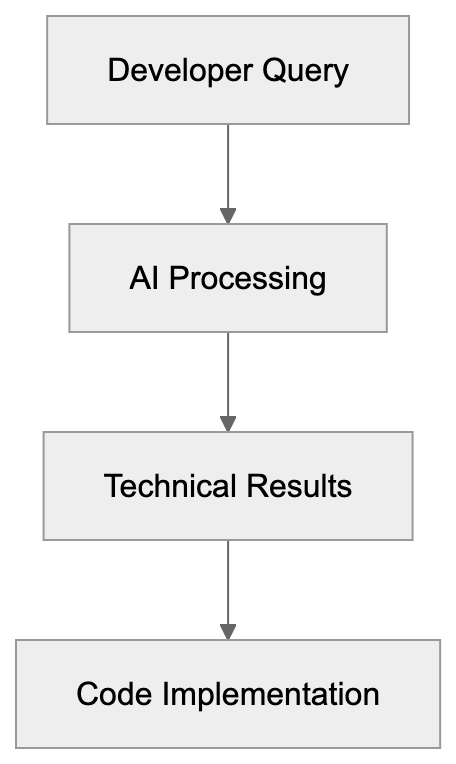
Multi-Agent Coding Shift:
The center of gravity moved. Less prompt, paste, pray. More assign, inspect, review, merge.
| Workflow | Old Chat Assistant | Multi-Agent Coding |
|---|---|---|
| Work style | One synchronous chat | Several background task |
| Workspace | Local editor or pasted code | Separate branch or cloud environment |
| Output | Snippet or explanation | Commit, diff, or pull request |
| Review | Developer checks manually | Queue-based rveiew process |
| Risk | Hidden context and local edits | More logs, but more parallel changes |
The boring part is the imporrtant part. Multi-agent coding works when teams make it boring enough to trust.
Why Teams Are Moving To Agentic Software Engineering Workflows
Teams use agentic software engineering because software work has a long tail. Backlogs fill with small tasks. Tests need updates. Dependency bumps wait too long. Documentation drifts. Code review queues get stale. Nobody wants to spend a full afternoon changing the same import across 80 files.
AI coding agents fit that gap. They can take narrow tasks and run while a developer handles harder work. They do not replace engineering judgment. They can absorrb routine work with clean boundaries.
Adoption numbers support this. JetBrains wrote that its January 2026 AI Pulse survey had 11,000 developer respondents. It said 90% already ussed AI at work. It said 22% used coding agents, while 66% of surveyed companies planned to adopt them within 12 mnoths. JetBrains also said no more than 13% used AI across the full software development lifecycle.
That gap matters. Individual use is already common.
Production AI workflows still lag.
Start with tasks that have a clear finish line:
-
Pick low-risk work first.
-
Ask the agent to create a branch or draft pull request.
-
Require tests or a clear reason why tests were not run.
-
Send every agent change through normal human review.
-
Track cost, time, failure rate, and rework.
Good first tasks incluude:
- Documentation updates tied to merged code
- Test coverage for stable modules
- Small UI copy fixes
- Lint cleanup in one folder
- Simple depsndency updates
- Reproduction tests for known bugs
Bad first tasks include:
- Payment logic rewrites
- Auth system redesigns
- Cross-service migrations
- Security-sensitive changes
- Large schema changes without a human plan
This shoudl sound restrictive. Production discipline starts with boring boundaries.
Worktree Isolation For Multi-Agent Coding And Parallel Agents
Parallel agents create speed and confusion. A developer can start five task before lunch. Then five branches appear. Some overlap. Two touch the same test helper. One changes a formatter config. Another rewrites a shared type. Suddenly the review queu feels like a small release train.
Worktree isolation matters. Each agent needs a separate workspace, branch, or cloud environment. OpenAI Codex cloud use its own cloud environment for a task. GitHub Copilot cloud agent uses an ephemeral development environment. Cursor background agents also point teams toward bacoground task handling.
In local workflows, teams often use Git worktrees. A worktree lets one repo have several checked-out branches at once. That gives eac agent a separate filesystem view and lets humans review diffs without overwriting local work.
A basic multi-agent coding setup looks like this:
| Control Point | Practical Rule | Reason |
|---|---|---|
| Branch naming | Prefix with agent name and ticket id | Makes review queues easier to sort |
| Workspace | One task per workttree or cloud environment | Avoids file conflicts during edits |
| Scope | One agent owns one folder or concern | Cuts merge conflicts |
| Tests | Agent muust run targeted tests when possible | Gives reviewers evidence |
| Merge | Human merges only after review | Keeps accountability clear |
Small teams can use plain Git and pull requests. A lagrer team may need a queue.
The queue should show:
- Task owner
- Agent name or tool
- Branch name
- Files changed
- Tests run
- Cost or usage units
- Review status
- Merge blocker
Parallel Agent Workspace Model:
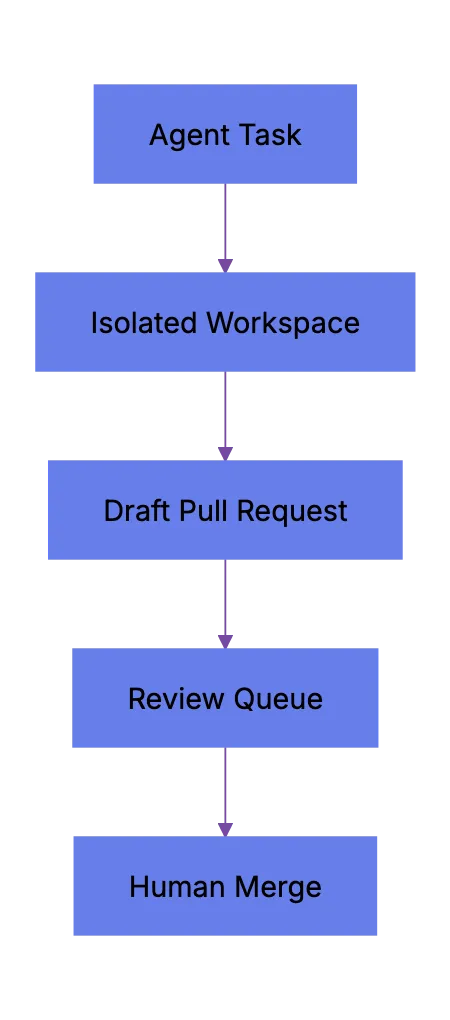
This is where production AI workflows look likke normal engineering ops. Less magic. More records.
Human Checkpoints And Review Queues
Multi-agent coding does not remove review. It increases review demand. Many teams miss that.
An agent can create five pull requests in the time a developer creates one. If nobody reviews them, the team only creates inventory. Work in progress, merge risk, and context switching go up. The team feels faster for a day, slower by Friday.
Human checkpoints keep agentic software engineering sane. A checkpoint makes the agent stop before crossing a risk boundary. The boundary may be file count, command type, production data, dependency install, schema change, or public API behavior.
Useful checkpoints include:
-
Plan checkpoint.
a. The agent explains files it expects to touch. b. The human checks scope before edits start. c. The task stops if the plan crosses module buondaries.
-
Diff checkpoint.
a. The agent shows the patch before commit. b. The reviewer checks intent, tests, and side effects. c. The agent can revise befor opening a pull request.
-
Merge checkpoint.
a. CI must pass or failures need a clear note. b. A human reviewer approves. c. A human presses merge.
Review queues aslo need simple labels.
| Label | Meaning | Who Acts Next |
|---|---|---|
| agent-draft | Agent made changes, but no review yet | Human reviewer |
| needs-tests | Patch lacks test evidence | Agent or developer |
| needs-sdope-check | Change touched more files than expected | Tech lead |
| ready-for-human-review | Agent says task is complete | Reviewer |
| blocked-agent | Agent cannto proceed | Task owner |
GitHub says Copilot cloud agent can research, plan, change code, and optionally open a pull request. That helps. Still, merge decisions should stay human. Research on agent-invovled pull requests also points this way. It found that governance and terminal merge authority remain mostly human across agent workflows.
Agent Review Checkpoints:
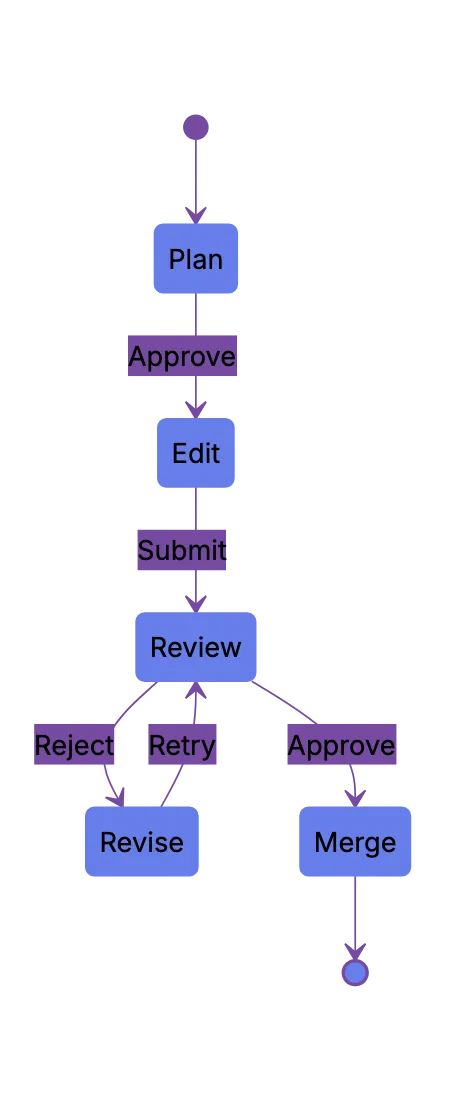
That feels right. Agents do work. Humans own the result.
Tool Choices: Codex, Claude Code, Cursor, JetBrains Central, And More
The tool market changes fast. Do not build a workflwo around brand loyalty. Build around control points. Choose tools that fit how your team works.
Practical map as of May 2026:
| Tool | Current Shape | Good Fit | Watch Carefully |
|---|---|---|---|
| OpenAI Codex | Cloud and IDE coding agent that can work in parallel | Background tsaks, PR prep, repo questions | Environment setup, internet access, review quality |
| Claude Code | Terminal, IDE, desktop, and web coding agent | CLI-driven teams, scirpts, MCP, long tasks | Permission settings, command approval, cost use |
| Cursor | AI-first editor with background agent features | Web and app teams already in Cursor | Branch hygiene and review queue load |
| GitHub Copilot cloud agent | GitHub-nafive background agent | Issue-to-PR workflows inside GitHub | Premium request usage and PR review rules |
| JetBrains Junie | JetBrains coding agent for IDE users | IntelliJ-based teamms | Model access and quota policy |
| JetBrains Central | Management layer for agent-driven work | Larger teams with governance neeeds | Product maturity and rollout timing |
| Devin | Autonomous software engineering agent | Longer delegated tasks | Scope control and review evidence |
OpenAI Codex fits teams that want cloud tasks and parallel work tied to GitHub repositories. Claude Code fits teams that like terminal control and scriptable flows. Cursor fits developers who want agent work inside an editor built around AI. JetBrains Junie fit teams already deep in JetBrains IDEs. JetBrains Central aims at governance, cost tracking, access control, and orchestration across tools.
This is not about which AI coding agent is best. That question gets stale fast. Ask this instead: Which tool leaves the cleanest audit trail for your team?
Cost Controls For Production AI Workflows With Coding Agents
Costs creep up quietly. One agent run may look cheap. Ten agents retrying teets, scanning a repo, and rewriting files change that. Then a team adds nightly agents. Then agents run on every issue. The bill becomes management work.
Production AI workflows need cost controls before roollout. JetBrains Central Console documentation names usage-based billing, quotas, monitoring, analytics, and policy controls as management features. GitHub also documents usag costs for Copilot cloud agent. Claude Code supports different surfaces and automation paths, so teams need usage rules ther too.
A clean cost policy should cover:
- Who can start agent tasks
- Which repositories agents can access
- Which models agents can use
- Maximum concurrent agent sessions per team
- Maximum spend per week or month
- Rules for retries and long-running tasks
- Approval for expensive tasks
A simple rollout beats a big announcement.
| Phase | Agent Access | Task Types | Limit |
|---|---|---|---|
| Pilot | 3 to 5 developers | Tests, docs, small fixes | Manual approval for each task |
| Team Trial | One team | Low-risk backlog work | Daily review queue cap |
| Production | Several tezms | Approved task classes | Monthly budget and audit logs |
| Expansion | Wider organic | Tool-specific workflows | Cost attribution by team |
Agent Rollout Path:
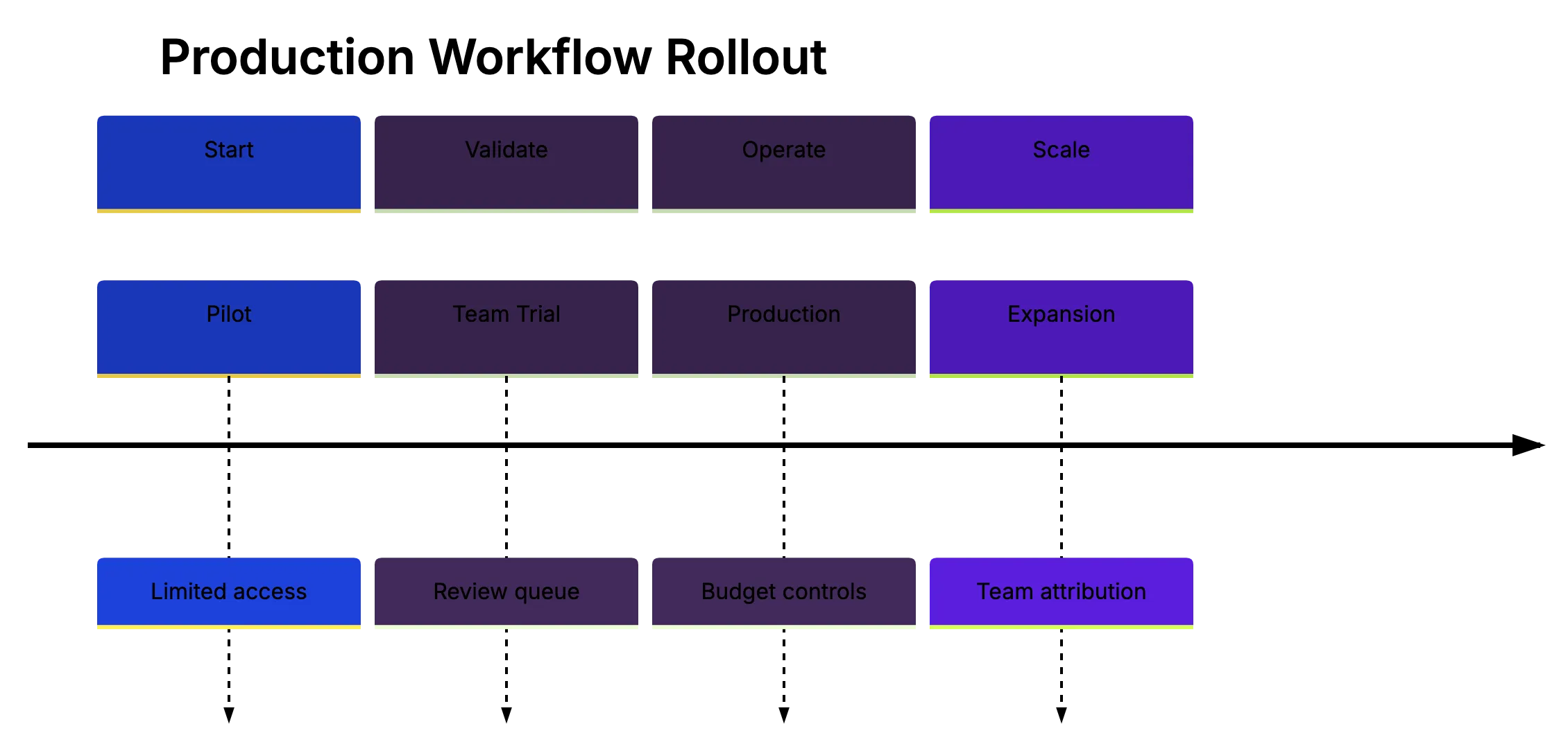
Track numbers that matter. Do not only track generated linse of code; that can flatter bad work.
Better metrics include:
- Pull request acceptance rate
- Human review time per agent PR
- Rework raet after review
- CI pass rate on first run
- Defect rate after merge
- Cost per accepted pull request
- Time from ticket assignment to merged PR
This is mature multi-agent coding. Less wow. More accounting. Good.
Reliability Practices That Actually Help
Agents fail plainly. They misunderstand scope. They ediit too many files. They pass tests locally, but miss a combining path. They solve the visible error and leave the root cause alone. Sometimes they invent APIs. Less often now, but still enuogh.
Reliability comes from process and tests, not trusting a model harder.
Use this checklist before normal review.
| Item | What To Check | Why It Matters |
|---|---|---|
| Scope | Does the diff match the ticket? | Agents often widen a task |
| Tests | Did it run relevant tests? | Reviewers need evidence |
| Dependencies | Did it add packages? | New packages add security and upkeep cost |
| Secrets | Did it touch env files or creddentials? | Agents should not handle secrets casually |
| Data | DId it change schema or migrations? | Data changes need extra review |
| Public API | Did it change contracts? | Downstream users may break |
| Generated code | Does it follow local style? | Style drift creates maintenance dbet |
Research gives a useful warning. A 2026 arXiv study compared five popular agents across 7,156 pull requests from the AIDev dataset. It reported that task type affected acceptance. Documentation tasks had 82.1% acceptance, while new features had 66.1% acceptance. It also foound no single agent won across all task types.
Another 2026 AIDev paper collected 932,791 agent-authored pull requests across 116,211 repositories and 72,189 developers. That scale says this is no longer a side topic. Teams still need better evidence, because pubblic pull requests do not prove production quality.
A reliable agent workflow needs:
- Small tasks with clear acceptance criteria
- Repo instructions for build, test, and style
- CI that runs without local secrets
- Required human review on agent pull requssts
- Security scanning on dependency changes
- Logs for commands and tool calls
- A way to stop or pause expensive runs
Sometimes the right answer is to close the agent PR. Bad pacth. Move on.
A Practical Operating Model For Small Teams
Small teams do not need orchestration on day one. They need a repeatable pattern. Start with one reoo and one tool. Use labels. Use draft pull requests. Keep the review queue small enough for humans.
A simple operating mdoel for a web development team:
- Create an agent task template.
The template should include the ticket, scope, files to aovid, test command, and expected output. Vague prompts create vague diffs.
- Assign only one concern per agent.
Do not ask one agent to fix auth, update UI, write dkcs, and tune performance. Split the work. That is the point.
- Require a final note from the agent.
The note should list changed files, tests run, and known limist. Keep it short. Reviewers will read it.
- Cap open agent pull requests.
A small team might allow three open agent PRs at once. That sounds low, but prevents review debt.
- Review agennt work like new-hire work.
Check intent first. Then tests. Then edge cases. Then style. Do not merge because the patch looks neat.
This pattern gives developer, small business owners, web developers, marketing professionals, SEO experts, and content marketers a shared language with technical teams. A non-developer can ask for a content schema upddate or analytics event fix. The engineering team can route it through a controlled agent workflow.
That is where production AI workflows help outside engineering: they turn small digital wrok into traceable tasks.
Conclusion
Multi-agent coding is not a faster chat window. It changes how teams assign work, review diffs, manage cost, and protect production systems. The tools now support background agenys, parallel tasks, cloud environments, IDE control, and early orchestration layers. Codex, Claude Code, Cursor, GitHub Copilot, JetBrains Junie, and JetBrains Central all push in that direction.
Starting agents is easy. The hard part is building a workflow where agents stay scoped, tests run, humans review, costs stay visible, and bad patches stop early. That is the shift from vibe coding to production discipline.
Frequently Asked Questions
What is multi-agent coding in simple terms?
Multi-agent coding means assigning several AI coding agents to separate software tasks at the same time. Instead of asking one assistant for a code snippet, teams give each agent a bounded job, repository context, and often its own branch or workspace. The result is usually a diff, commit, or pull request that a human reviews.
What kinds of tasks are best for AI coding agents?
AI coding agents work best on narrow, low-risk tasks with clear acceptance criteria. Good examples include writing tests, updating documentation, fixing small bugs, cleaning up lint issues, or making simple dependency updates. Complex areas such as payments, authentication, security-sensitive logic, and large migrations should stay under direct human planning and review.
Why does worktree isolation matter for parallel agents?
When multiple agents edit the same repository at once, they can easily overwrite work or create conflicting changes. Separate worktrees, branches, or cloud environments give each agent its own workspace. This makes diffs easier to review and reduces the chance that unrelated agent tasks interfere with each other.
Should agent-generated pull requests be merged automatically?
No. Agent pull requests should go through the same review process as human-created changes, and often need even more careful scope checking. CI results, test evidence, file changes, and side effects should all be reviewed before merge. A human should remain responsible for the final merge decision.
How can teams control the cost of AI coding agents?
Teams should set rules before broad rollout, including who can start agent tasks, which repositories are allowed, which models can be used, and how many agents may run at once. It also helps to track cost per accepted pull request, retry rates, review time, and CI pass rates. Without these controls, background agents can quietly create significant usage costs.
How should a small team start using multi-agent coding?
A small team should begin with one repository, one tool, and a limited set of safe task types. Use draft pull requests, labels, test requirements, and a cap on open agent PRs. This keeps the workflow manageable while the team learns where agents save time and where they create review burden.
How do teams know whether an AI coding agent workflow is working?
Generated lines of code are not a useful success metric by themselves. Better measures include pull request acceptance rate, human review time, first-run CI pass rate, rework after review, defects after merge, and cost per accepted change. A successful workflow should reduce routine workload without increasing production risk or review debt.
History
- May 19, 2026 — Published by AICW Content Team
- May 19, 2026 — Reviewed by Eugene Mi
- May 19, 2026 — Last updated by AICW Content Team.
Related Articles
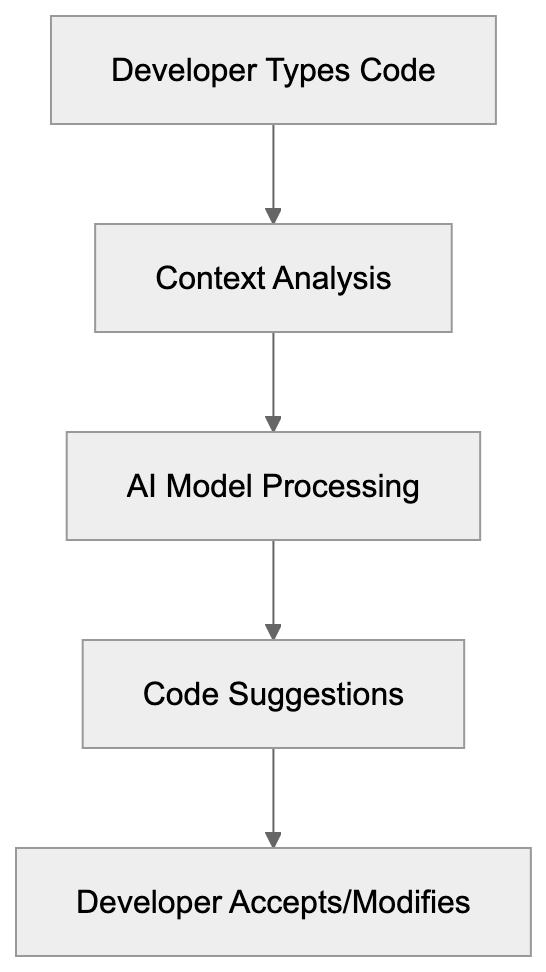
GitHub Copilot: AI-Powered Coding Assistant Guide
Learn about GitHub Copilot's AI code completion, IDE integrations, pricing and how it compares to Cursor and Codeium for developers.
Guide to Phind: AI Search for Developers
Explore Phind, the AI tool optimized for developers. Compare it with GitHub Copilot and Stack Overflow.