Bing Webmaster Tools & IndexNow Setup Guide
Complete guide to Bing Webmaster Tools and IndexNow protocol. Learn API setup, URL submission methods, WordPress plugins, and Cloudflare integration.
Table of Contents
- What Are Bing Webmaster Tools and IndexNow
- Why Bing Webmaster Tools Matter for Your Site
- Setting Up Bing Webmaster Tools
- Understanding the IndexNow Protocol
- How to Implement IndexNow API
- WordPress Plugins for IndexNow
- Cloudflare Crawler Hints Integration
- Comparing IndexNow to Other Indexing Methods
- Best Practices for Bing and IndexNow
- Monitoring Results in Bing Webmaster Tools
- Common Issues and Solutions
- IndexNow Adoption and Future
- Alternatives to IndexNow Protocol
- Conclusion
- What Are Bing Webmaster Tools and IndexNow
- Why Bing Webmaster Tools Matter for Your Site
- Setting Up Bing Webmaster Tools
- Understanding the IndexNow Protocol
- How to Implement IndexNow API
- WordPress Plugins for IndexNow
- Cloudflare Crawler Hints Integration
- Comparing IndexNow to Other Indexing Methods
- Best Practices for Bing and IndexNow
- Monitoring Results in Bing Webmaster Tools
- Common Issues and Solutions
- IndexNow Adoption and Future
- Alternatives to IndexNow Protocol
- Conclusion
What Are Bing Webmaster Tools and IndexNow
Bing Webmaster Tools is Microsoft’s platform for site owners and developers. It helps you monitor how your website performs in Bing Search. The platform shows 16 months of historical data about your site’s performance. You get insights about search queries, click rates, and crawl errors. Notably, the platform now includes a Copilot assistant to help you better understand the data.
IndexNow is a protocol that allows you to notify search engines instantly when content changes. Instead of waiting for search engines to crawl your site, you push updates directly. The protocol handles over 2.5 billion URL submissions each year. Sites using IndexNow see their content indexed in minutes instead of days. As reported by Microsoft Research, the protocol has significantly improved the speed and efficiency of content indexing across participating search engines. Microsoft and Yandex developed IndexNow together with other search partners. When you submit URLs through IndexNow, participating search engines are notified all at once.
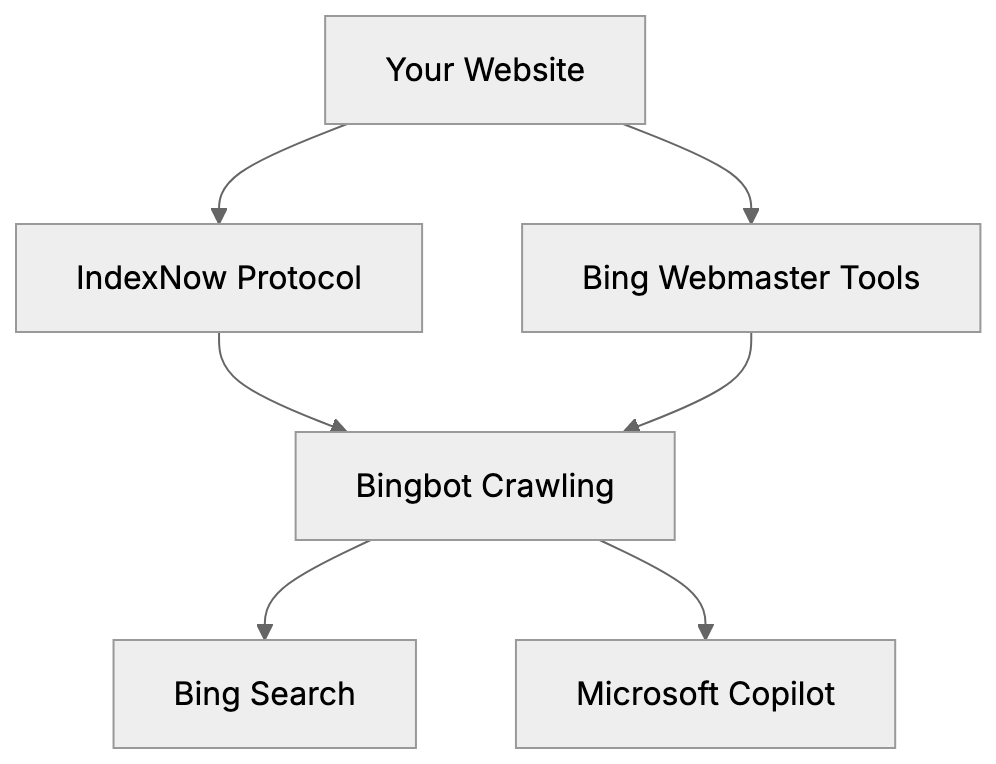
Bing Webmaster Tools and IndexNow Integration:
These tools matter because Bingbot now feeds both Bing Search and Microsoft Copilot. Improved Bing visibility means your content appears in Copilot responses as well. For developers and content marketers, this provides a direct path to AI-powered search results. Small business owners benefit from faster Bing indexing without technical complexity.
Why Bing Webmaster Tools Matter for Your Site
Bing holds roughly 3% of global search market share, but numbers tell a different story in specific regions. In the United States, Bing powers around 6-7% of searches. According to Statista, Bing’s market share in the U.S. has been steadily increasing over the past few years. More importantly, Bing is the default search engine for Windows devices and the Microsoft Edge browser. Corporate environments often use Bing as their standard search tool.
The connection to Microsoft Copilot changes everything. Copilot uses Bing’s index to answer questions and provide information. When someone asks Copilot a question, it pulls from websites indexed by Bingbot. Improving for Bing Search directly enhances your chances of appearing in Copilot responses. This is crucial as AI assistants become primary information sources.
Bing Webmaster Tools provides data you won’t find on other platforms. The interface shows which pages get crawled most often. You can see server response times and mobile usability issues. The tool identifies broken links and redirect chains. For sites targeting business audiences or Windows users, improving on Bing isn’t optional anymore.
Setting Up Bing Webmaster Tools
The first step is creating a Microsoft account if you don’t have one. Visit bing.com/webmasters and sign in. Click the “Add a site” button and enter your website URL. Bing needs to verify you own the domain before showing data.
Verification works in three ways:
- XML file method: Upload a file to your root directory.
- Meta tag: Add code to your homepage header.
- CNAME record: Update your DNS settings.
Bing Webmaster Tools Verification Methods:
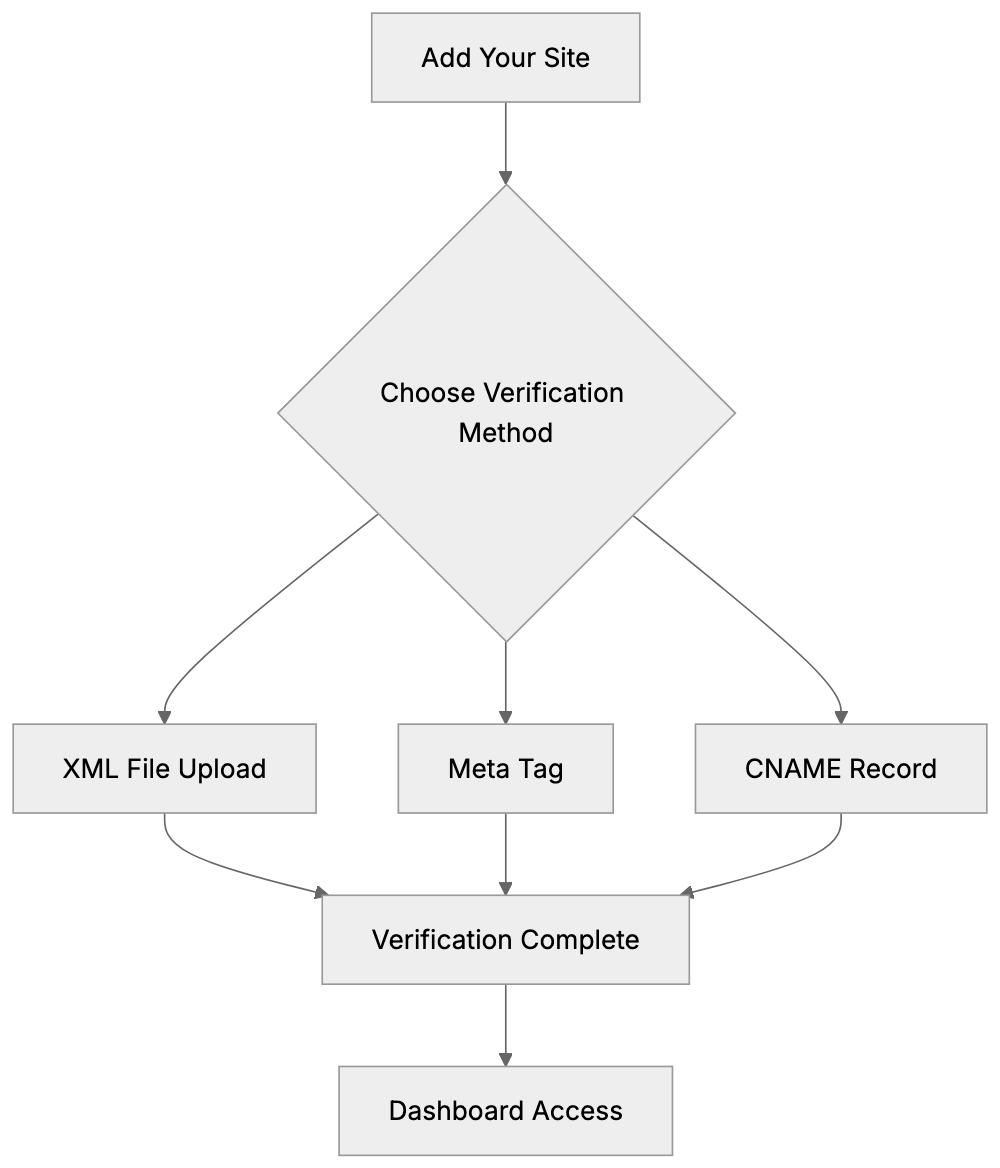
Most users choose the XML file method because it is straightforward. Download the XML file from Bing, upload it to your site root, then click verify.
After verification, Bing starts collecting data. The dashboard takes a few days to populate. You’ll see search performance metrics, indexing status, and crawl information. The Copilot assistant appears in the top right corner. You can ask it questions about your data like “Why did traffic drop last week?” or “Which pages have crawl errors?”
The platform lets you submit sitemaps directly. Go to the Sitemaps section and paste your sitemap URL. Bing crawls the sitemap and discovers your pages faster. You can submit multiple sitemaps if your site is large. The tool shows how many URLs Bing discovered from each sitemap.
Understanding the IndexNow Protocol
IndexNow was developed to solve a basic problem. Search engines waste resources crawling sites that haven’t changed, while sites wait days or weeks for new content to appear in search results. IndexNow creates a direct notification system instead.
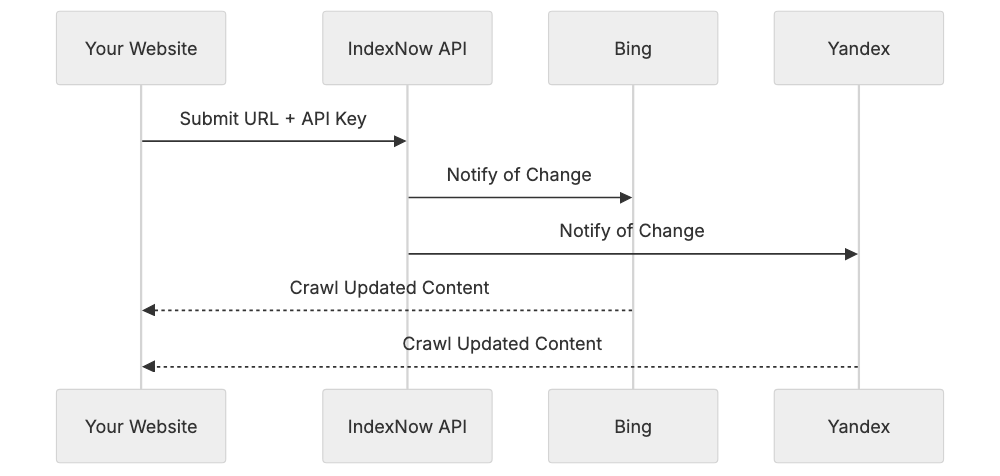
The protocol works through API endpoints. When you publish or update content, your site sends a notification to api.indexnow.org. The notification includes the changed URL and your API key. IndexNow then alerts all participating search engines at once. Currently, Microsoft Bing and Yandex are the main participants.
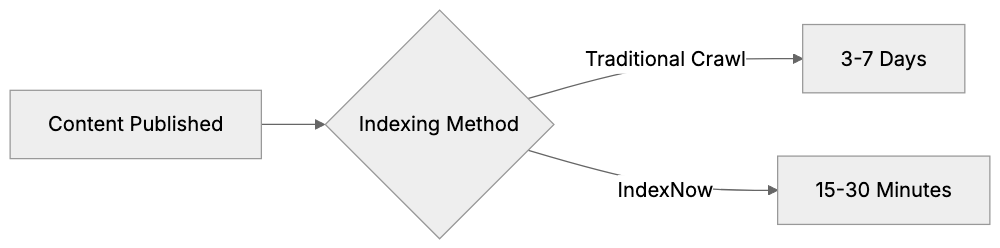
The speed difference is significant. Traditional crawling can take 3-7 days for new pages, while IndexNow typically gets pages indexed within 15-30 minutes. For time-sensitive content like news or product launches, this speed matters. The protocol uses minimal bandwidth since you only notify about actual changes.
IndexNow doesn’t guarantee indexing or ranking. It merely speeds up discovery. Search engines still decide whether to index your content based on quality signals. Think of it as knocking on the door instead of waiting for someone to walk by.
IndexNow Notification Flow:
How to Implement IndexNow API
Setting up starts with generating an API key. The key can be any string of characters between 8-128 characters long. Most people use a UUID generator or random string generator. Your key might look like a1b2c3d4-e5f6-g7h8-i9j0-k1l2m3n4o5p6.
Next, create a text file named exactly as your API key. If your key is a1b2c3d4-e5f6-g7h8-i9j0-k1l2m3n4o5p6, then create a1b2c3d4-e5f6-g7h8-i9j0-k1l2m3n4o5p6.txt. Put your API key inside this file as the only content. Upload the file to your site’s root directory. This lets IndexNow verify you control the domain.
Submitting URLs works in two ways:
- GET request:
GET request to api.indexnow.org/indexnow?url=yoursite.com/page&key=yourkey. - POST request: Sends JSON with the URL, key, and optionally, multiple URLs at once. POST is better for bulk submissions.
Here’s a POST request example in JSON format:
{
  "host": "example.com",
  "key": "a1b2c3d4e5f6g7h8i9j0",
  "urlList": [
    "https://example.com/page1",
    "https://example.com/page2"
  ]
}
You can submit up to 10,000 URLs per request. The API returns HTTP 200 if successful. Error codes tell you what went wrong, like an invalid key or malformed URL. No rate limits exist currently, but don’t spam unnecessary submissions.
WordPress Plugins for IndexNow
WordPress users don’t need to code API requests manually. Several plugins handle IndexNow automatically when you publish or update content. The official IndexNow plugin from Microsoft is the simplest option. Install it, add your API key, and it submits URLs automatically.
Yoast SEO added IndexNow support in version 17.3. If you already use Yoast, enable IndexNow in the settings. The plugin generates an API key for you. It submits URLs whenever you publish or update posts and pages. Yoast handles the key file creation and hosting automatically.
Rank Math SEO includes IndexNow as well. Go to the Rank Math settings, find the IndexNow section, and toggle it on. Like Yoast, Rank Math manages everything behind the scenes. It submits your content to all participating search engines with each publish action.
The dedicated IndexNow plugin offers more control. You can choose which post types get submitted. The plugin logs all submissions so you can verify they’re working. It also lets you manually submit URLs if needed. For sites publishing frequently, the dedicated plugin provides better visibility into what’s happening.
Cloudflare Crawler Hints Integration
Cloudflare offers automatic IndexNow setup through a feature called Crawler Hints. If your site uses Cloudflare, you can enable this without touching your site’s code. Crawler Hints monitors when your cache updates and automatically notifies IndexNow.
To set it up, log into your Cloudflare dashboard. Go to the Caching section and find Crawler Hints. Toggle it on. Cloudflare handles API key generation and management. When Cloudflare’s cache updates with new content, it sends IndexNow notifications automatically.
This method works great for static sites or sites with caching layers. The notification happens at the CDN level, not your origin server. You don’t need plugins or custom code. Cloudflare’s infrastructure handles all the API requests. The system scales automatically no matter how many pages you update.
Crawler Hints works for all Cloudflare plans, including the free tier. The feature submits URLs to all IndexNow participants simultaneously. You can see submission logs in the Cloudflare dashboard. For high-traffic sites, this removes the burden of making API calls from your server.
Comparing IndexNow to Other Indexing Methods
Traditional XML sitemaps are passive. You create a sitemap file listing your URLs. Search engines crawl the sitemap periodically. The timing depends on your site’s crawl budget and importance. Changes might not get noticed for days or weeks. According to a study by Gartner, XML sitemaps have become less effective for SEO purposes due to changes in search engine algorithms and crawling behaviors.
Google Search Console offers URL inspection too. You can request indexing for individual URLs. Google limits how many requests you can make. The process is manual and doesn’t scale well. Google also has its own ping mechanism for sitemaps, but it’s not instant.
IndexNow differs because it’s immediate and automatic. Your site actively tells search engines about changes. No waiting for the next crawl cycle. The protocol supports bulk submission, unlike manual inspection tools. It’s also bidirectional, allowing search engines to provide feedback.
Here’s how the main options compare:
| Method | Speed | Automation | Bulk Support | Setup Difficulty |
|---|---|---|---|---|
| XML Sitemap | Days | Passive | Yes | Easy |
| Google URL Inspection | Hours | Manual | No | Easy |
| Bing URL Submission | Hours | Manual | Limited | Easy |
| IndexNow | Minutes | Automatic | Yes | Medium |
| RSS/Atom Feeds | Hours | Passive | Yes | Easy |
Indexing Speed Comparison:
Ping services like Pingomatic notify blog directories but not search engines directly. They’re mostly outdated now. IndexNow represents the modern approach to search engine notification.
Best Practices for Bing and IndexNow
Don’t submit every URL on your site immediately. Focus on new content and meaningful updates. Submitting unchanged URLs wastes resources and provides no benefit. Search engines may throttle or ignore excessive submissions from the same domain.
Keep your API key secure but not secret. It’s okay if the key file is publicly accessible since that’s required for verification, but don’t share your key across multiple unrelated sites. Generate unique keys for each domain you manage.
Monitor your submissions through Bing Webmaster Tools. The platform shows which URLs got submitted via IndexNow. Check if they’re getting indexed successfully. If pages aren’t indexing despite notifications, investigate content quality or technical issues.
Combine IndexNow with good SEO fundamentals. The protocol speeds up discovery but doesn’t improve rankings. Ensure your content is valuable, your site is technically sound, and your pages are crawlable. IndexNow enhances good practices; it doesn’t replace them.
Test your setup before going live. Submit a test URL and verify it appears in Bing within an hour. Check that your key file is accessible at yourdomain.com/yourkey.txt. Ensure your site isn’t blocking search engine bots in robots.txt.
Monitoring Results in Bing Webmaster Tools
The URL Inspection tool in Bing Webmaster Tools shows IndexNow submission data. Enter any URL from your site and click inspect. The report shows when the URL was last submitted via IndexNow. It also displays crawl status and any indexing issues.
The Crawl section reveals how Bingbot interacts with your site. You’ll see crawl stats broken down by day. Look for patterns after implementing IndexNow. You should notice faster discovery of new pages. The crawl rate might actually decrease since Bing doesn’t need to check as often for updates.
Performance reports show clicks and impressions from Bing Search. Watch for improvements after IndexNow setup. New pages should start generating impressions faster than before. Compare the time between publication and first impression for pages published before and after IndexNow.
The Copilot visibility aspect is harder to measure directly. Bing Webmaster Tools doesn’t separate Copilot traffic yet, but better indexing naturally improves Copilot’s ability to reference your content. Monitor for increases in Bing referral traffic overall as a proxy metric.
Common Issues and Solutions
API key verification fails when the key file isn’t in the root directory. Make sure the file sits at yourdomain.com/keyname.txt, not in a subdirectory. Check that the file contains only your API key with no extra spaces or characters. The file should be plain text, not HTML.
HTTP errors during submission usually mean malformed requests. Verify your JSON formatting if using POST requests. Make sure URLs are properly encoded. The host parameter must match the domain of submitted URLs. Check that you’re using HTTPS if your site uses SSL.
URLs submitted but not indexed suggest content quality issues. IndexNow notifies search engines, but they decide whether to index. Check for thin content, duplicate content, or noindex tags. Ensure the page is actually valuable and not blocked by robots.txt.
Plugin conflicts happen when multiple WordPress plugins try to submit the same URLs. Use only one IndexNow plugin at a time. Disable IndexNow in Yoast if you’re using the dedicated plugin. Check your server logs for duplicate API calls.
Rate limiting isn’t officially documented, but excessive submissions can cause problems. If you’re rebuilding a large site, space out submissions over hours, not minutes. For routine updates, plugins handle this automatically at reasonable rates.
IndexNow Adoption and Future
Microsoft Bing and Yandex are the primary IndexNow supporters. Several smaller search engines have joined the protocol. Google hasn’t adopted IndexNow yet despite it being an open standard, as they likely prefer their existing infrastructure and crawl systems.
The protocol reached 2.5 billion URL submissions annually across all participating sites. Adoption grew significantly among CMS platforms and hosting providers. Cloudflare’s integration brought thousands of sites into the system automatically. WordPress plugins made setup accessible to non-technical users.
Future development focuses on feedback mechanisms. Search engines might provide more detailed responses about submission results. The protocol could expand to notify about removed content or URL changes. Broader adoption depends on more search engines joining the initiative.
For content marketers and SEO experts, IndexNow is becoming standard practice. The minimal effort required makes it worthwhile even if only Bing benefits. As AI search tools like Copilot grow, quick Bing indexing becomes more valuable. Sites ignoring IndexNow leave speed advantages on the table.
Alternatives to IndexNow Protocol
Google’s Indexing API exists but serves a narrow purpose. Google restricts it to job postings and livestream structured data. Using it for regular pages violates their terms. The API requires OAuth authentication and is more complex than IndexNow. As detailed in Google’s official documentation, the Indexing API is intended for specific use cases and is not a general-purpose indexing solution.
PubSubHubbub (WebSub) is a protocol for real-time feed updates. It notifies subscribers when RSS or Atom feeds change. Some search engines monitor WebSub for blog content, but it’s less direct than IndexNow and requires a hub server.
Direct sitemap ping services let you notify Google and Bing about sitemap updates. Submit a GET request to google.com/ping?sitemap=yoursitemap.xml. This tells search engines to recrawl your sitemap. It’s less granular than IndexNow since you can’t specify individual URLs.
WordPress pingback/trackback systems notify other WordPress sites about links. These don’t affect search engines directly. They’re mostly outdated and disabled on many sites. The mechanism doesn’t compare to IndexNow’s purpose.
Here’s a comparison of notification methods:
| Protocol | Target | URL-Level | Real-Time | Complexity |
|---|---|---|---|---|
| IndexNow | Search Engines | Yes | Yes | Low |
| Google Indexing API | Google Only | Yes | Yes | High |
| WebSub | Feed Readers | Feed-Level | Yes | Medium |
| Sitemap Ping | Search Engines | No | No | Very Low |
| Pingback | Other Sites | Yes | Yes | Low |
IndexNow offers the best balance of simplicity, speed, and broad reach for search engine notification.
Conclusion
Bing Webmaster Tools provides essential insights for site owners targeting Bing Search and Microsoft Copilot. The platform’s 16 months of historical data and Copilot assistant help you understand performance. Setting up takes minutes through simple verification steps. The connection between Bingbot and Copilot makes Bing improvement crucial beyond market share.
IndexNow changes how search engines respond to content changes. The protocol delivers minutes-to-index speed instead of days-to-weeks waiting. Setup ranges from simple WordPress plugins to automated Cloudflare integration. Over 2.5 billion annual URL submissions prove the protocol’s adoption and value. Combining Bing Webmaster Tools with IndexNow forms a comprehensive improvement strategy for Microsoft’s search system.
For developers and marketers, these tools offer substantial benefits with minimal effort. Even if you focus primarily on Google, ignoring Bing and IndexNow leaves opportunities untapped. The technical setup is straightforward for small business owners while providing depth for SEO experts. As AI assistants reshape search behavior, quick indexing and Bing visibility become competitive advantages worth pursuing.
Frequently Asked Questions
What are the benefits of using Bing Webmaster Tools?
Bing Webmaster Tools offers valuable insights into your site’s performance on Bing, including search queries, click rates, and crawl errors. Its historical data can help identify trends over time, and the recently integrated Copilot assistant can answer specific queries about your data.
How quickly does IndexNow index new content?
IndexNow can index new or updated content within minutes, typically achieving results in 15-30 minutes. This is a significant improvement over traditional methods, which can take several days for new pages to be discovered.
What do I need to implement IndexNow?
To implement IndexNow, you will need to generate a unique API key, create a verification file containing that key, and upload it to your website’s root directory. You can then use either GET or POST requests to notify the IndexNow API when content is published or updated.
Are there any specific plugins for WordPress users to use IndexNow?
Yes, WordPress users can utilize several plugins for IndexNow, including the official IndexNow plugin from Microsoft, Yoast SEO (version 17.3 and later), and Rank Math SEO. These plugins automate the submission of URLs whenever you publish or update content.
What should I do if my API key verification fails?
If your API key verification fails, ensure that the key file is placed in the root directory of your site and that it contains only the API key without any extraneous characters. Also, confirm that the URL is accessible at the correct path.
Can I use both Bing Webmaster Tools and IndexNow together?
Absolutely! Using Bing Webmaster Tools in conjunction with IndexNow provides a comprehensive strategy for improving your site’s visibility and indexing speed on Bing. You can monitor how effectively your URLs are being indexed through Webmaster Tools while utilizing the immediate notifications provided by IndexNow.
Is there a downside to using IndexNow?
While IndexNow speeds up the indexing process, it does not guarantee that submitted content will be indexed or rank well. Search engines still assess content quality and relevancy, so it is crucial to ensure your site’s content and technical aspects are optimized for the best results.